Mobile App Stores: Full List, Size Comparison, and Promotion Strategy
If you're planning a launch for the US, UK, Canadian, or Australian market, the decision usually comes down to two stores. But treating Apple App Store and Google Play as the whole distribution landscape means leaving reach, revenue-share advantages, and lower-competition placements on the table. This guide covers every store worth knowing for an English-speaking audience, how big each one actually is, and what promotion looks like on each.
Introduction: Why App Stores Still Matter
Why distribution channels are not interchangeable
Each store has its own review process, its own ranking algorithm, its own audience habits, and its own promotional tools. A screenshot set that converts well on the App Store won't necessarily convert on Google Play, because the two stores show different amounts of information above the fold before a user taps through. A revenue-share structure that makes a niche OEM store worthwhile for a subscription app might make it pointless for an ad-supported free app. Treating every store as a copy-paste of Google Play is one of the more common reasons a secondary listing underperforms.
Why the English-speaking market is the right starting point
US, UK, Canadian, and Australian users share a language, but not identical habits, pricing expectations, or spelling conventions. They're also the audience where Apple's and Google's own stores dominate almost completely — unlike China or parts of Southeast Asia, where OEM stores and third-party marketplaces carry real weight. That makes the English-speaking market a comparatively simple place to start: get the two major stores right first, then decide selectively whether an OEM store adds anything.
Consumer app stores vs alternative distribution channels
It's worth separating two different things that both get called "app stores":
- Consumer app stores — Apple App Store, Google Play, Samsung Galaxy Store, Amazon Appstore, and similar platforms where end users browse and download apps directly.
- Alternative distribution channels — third-party marketplaces that exist because of regulation rather than because Apple or Google built them. Under the EU's Digital Markets Act, iOS users in the European Union (and, since December 2025, in Japan under the Mobile Software Competition Act) can install apps from marketplaces like AltStore PAL or Aptoide. In the US, Google began opening the Play Store's app catalog to third-party Android marketplaces in July 2026, following the Epic v. Google ruling.
These regulatory channels are still niche in terms of actual installs — reporting on the EU rollout consistently describes third-party marketplace adoption as small relative to the App Store itself. But the direction is clear: the two-store duopoly is being pried open by courts and regulators in more markets than just Europe, and that's worth watching even if it isn't yet a reason to change your launch plan.
The Main App Stores to Cover
Apple App Store
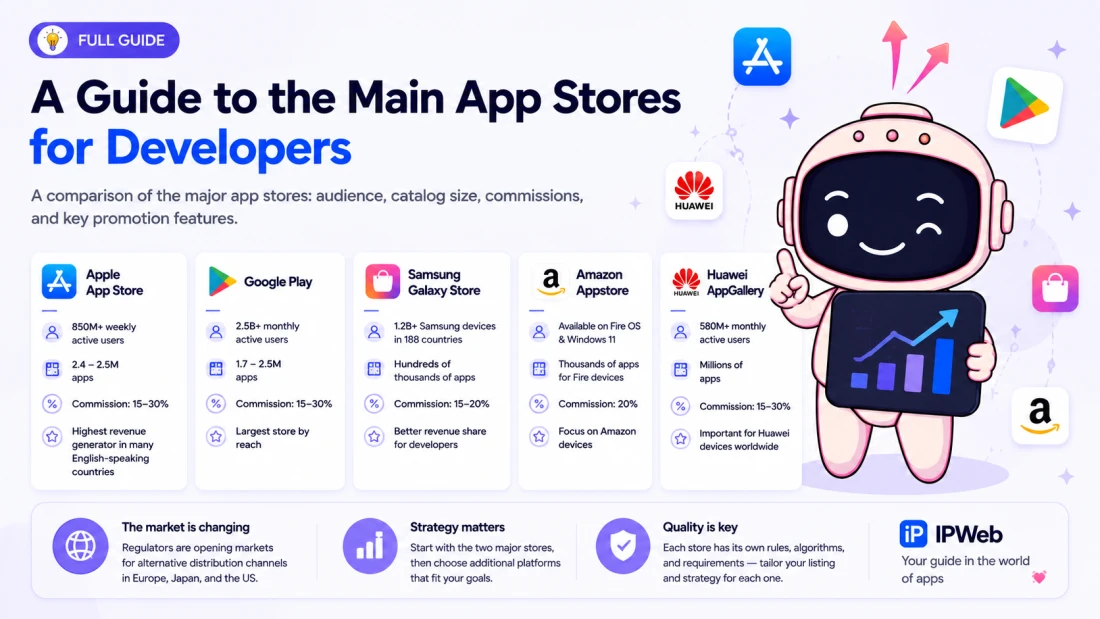
The App Store remains the highest-value channel by revenue for English-speaking markets, particularly the US. Apple's own reporting put weekly active users at over 850 million across 175 countries and regions as of early 2026 — the only first-party usage figure any store in this list has actually disclosed. Third-party trackers estimate the catalog at somewhere between 2.4 and 2.5 million apps, though exact counts vary noticeably depending on which crawler and which date you're looking at.
Google Play
Google states that Play serves more than 2.5 billion monthly users across 190+ countries, making it the largest Android storefront by reach. The app count is harder to pin down: independent trackers have reported anywhere from roughly 1.7 million to 2.5 million apps in 2026, a wide range that reflects Google's own aggressive cleanup of the catalog — in 2025 alone, Google reported rejecting 1.75 million apps and blocking more than 80,000 developer accounts for policy violations.
Samsung Galaxy Store
Galaxy Store comes preinstalled on roughly 1.2 billion Samsung devices across 188 countries, which makes it the most relevant OEM store for English-speaking markets given Samsung's device share in the US, UK, Canada, and Australia. Since May 2025, Samsung pays developers an 80/20 revenue split on apps and games (up from 70/30) and 85/15 on auto-renewing subscriptions — noticeably better terms than Google Play's standard split for many app categories.
Amazon Appstore
Amazon Appstore's role changed meaningfully in 2025. As of August 20, 2025, the store is no longer accessible on third-party Android devices, and previously purchased apps stopped working on non-Amazon hardware. What remains is a Fire OS-focused storefront: it's still the default app store on Fire tablets and Fire TV devices, and it's still available as a standalone install on Windows 11 — just no longer through the Microsoft Store, and no longer as a general-purpose alternative to Google Play on any Android phone. If your app targets Fire tablet or Fire TV owners specifically, it's still worth a listing; as a broad secondary channel for Android phones, it no longer serves that purpose.
Huawei AppGallery
AppGallery matters primarily outside the core English-speaking market. Huawei's last officially disclosed figure was over 580 million monthly active users at the end of 2023; more recent third-party estimates for 2026 put the number closer to 400 million, though Huawei doesn't publish this data on a regular schedule, so any current figure should be treated as an estimate rather than a confirmed number. For US audiences specifically, Huawei's near-total absence from the market due to trade restrictions makes AppGallery low priority. It's more relevant if your distribution plan extends into parts of Europe or markets without Google Mobile Services.
Microsoft Store
Microsoft Store needs a correction that a lot of older guides still miss: it is not currently a channel for mobile apps. Microsoft ended support for the Windows Subsystem for Android on March 5, 2025, which also removed Amazon Appstore access from within the Microsoft Store itself. Today, Microsoft Store functions as a store for desktop and UWP Windows applications — useful if you're distributing a Windows client, irrelevant if your goal is reaching phone users.
Xiaomi GetApps
GetApps ships preinstalled on Xiaomi devices and claims over a million listed apps. Xiaomi holds a meaningful share of the global smartphone market — around 14% as of mid-2025 — but that share is concentrated in India, Southeast Asia, and parts of Europe rather than the US, UK, Canada, or Australia. For a purely English-speaking market strategy, GetApps is a store to know about, not one to prioritize.
Oppo App Market
Oppo's official store, also listed as over a million apps, follows the same pattern: strong in Southeast Asia, present in parts of Europe, essentially absent from the core English-speaking device landscape. It's worth a place on your radar if your roadmap includes expansion into ASEAN markets, not if your launch is scoped to US/UK/CA/AU.
Vivo App Store
Vivo's storefront rounds out the group of Chinese OEM stores with a similar profile — over a million apps, strong regional footprint in Asia, minimal relevance to English-speaking device users. The three — Xiaomi, Oppo, and Vivo — are best treated as a set: valuable together if you're expanding into markets where these brands actually sell phones, low priority otherwise.
OneStore
OneStore is South Korea's second-largest app marketplace, formed from a merger of SK Telecom, KT, LG Uplus, and Naver's app storefronts, and it carries real weight in gaming distribution domestically. For an English-speaking market strategy it's a niche addition at best. It's also worth flagging as a moving target right now: in June 2026, NEXUS acquired a majority stake in OneStore and announced plans to reposition it as a distribution channel for blockchain games while keeping the existing marketplace infrastructure running. Anyone considering OneStore as part of a longer-term plan should treat that transition as an open question rather than a settled fact.
Why these stores belong in the list
Each one either controls meaningful device share (Samsung, Amazon on its own hardware) or represents a structural shift in how apps get distributed (regulatory marketplaces, Google's opening of Play's catalog to third parties). Leaving them out of a "full list" article would mean ignoring both the current OEM landscape and where distribution is heading.
Which stores matter most for English-speaking users
In practical terms: Apple App Store and Google Play cover the overwhelming majority of US/UK/CA/AU users. Samsung Galaxy Store is the one OEM store genuinely worth a look given Samsung's device share in these markets. Amazon Appstore only matters if you specifically target Fire tablet or Fire TV owners. Everything else — Huawei, Xiaomi, Oppo, Vivo, OneStore — is more relevant to markets outside the English-speaking core, and should be treated as expansion options rather than launch requirements.
How to group stores by priority
A simple three-tier framework keeps this manageable:
Core stores, secondary stores, niche stores
- Core: Apple App Store, Google Play — non-negotiable for any English-speaking market launch.
- Secondary: Samsung Galaxy Store, Amazon Appstore (for Fire devices specifically) — worth adding once the core listings are stable and optimized.
- Niche: Huawei AppGallery, Xiaomi GetApps, Oppo App Market, Vivo App Store, OneStore — add only if your target geography or device mix specifically calls for it.
Market Size and Relative Scale
|
Tier |
Stores |
Scale |
|
Tier 1 |
Apple App Store, Google Play |
The two dominant global channels; maximum reach for English-speaking markets |
|
Tier 2 |
Samsung Galaxy Store, Amazon Appstore, Huawei AppGallery, Microsoft Store |
Meaningful but noticeably smaller reach; relevance often tied to a specific device ecosystem |
|
Tier 3 |
Xiaomi GetApps, Oppo App Market, Vivo App Store, OneStore |
Regional or device-specific stores, typically added for market expansion beyond the English-speaking core |
Tier 1 stores: Apple App Store and Google Play
Between them, these two stores account for the vast majority of app discovery in every English-speaking market. Apple reports over 850 million weekly App Store users; Google states Play reaches 2.5 billion-plus monthly users worldwide. Revenue skews toward Apple even though installs skew toward Android globally — a split that reflects both device pricing and regional purchasing power rather than one store simply "winning."
Tier 2 stores: device and ecosystem stores
Samsung Galaxy Store, Amazon Appstore, Huawei AppGallery, and Microsoft Store share one trait: their reach is tied to a specific hardware ecosystem rather than to the open Android or iOS install base. That's not necessarily a disadvantage — a Galaxy Store listing reaches every Samsung device owner directly, without competing against the App Store or Play's full catalog for the same shelf space.
Tier 3 stores: regional and niche stores
Xiaomi GetApps, Oppo App Market, Vivo App Store, and OneStore are large in absolute terms — each hosting well over a million apps — but their user bases concentrate in specific regions (China, India, Southeast Asia, South Korea) rather than in the US, UK, Canada, or Australia. Treat them as market-expansion tools, not core distribution.
How to describe scale without overclaiming
Every app-count figure in this space comes from a third-party tracker crawling public storefront data, not from an official disclosure by Apple or Google. Different trackers report meaningfully different numbers for the same store in the same month. The honest way to cite these figures is with a source and a date attached — "approximately 2.4 million apps as of mid-2026, per 42matters" — rather than as a fixed, unchanging fact.
Why app count is not the same as user reach
A store can host millions of apps and still reach a fraction of the users of a store with fewer listings. Huawei AppGallery's 220,000+ HMS apps figure, for instance, sits alongside a user base that's a small fraction of Google Play's — the count of apps in a catalog says very little about how many people will actually see yours.
App inventory vs active audience
When evaluating a store, weigh two separate questions: how many apps are competing for attention (inventory), and how many real users are browsing that inventory (audience). A store with a smaller catalog but a highly engaged, well-defined audience can outperform a store with a much larger, more diluted one.
Practical interpretation for marketers
For a launch decision, audience size and device-ecosystem fit matter more than raw app-count. A Samsung Galaxy Store listing is worth pursuing because of Samsung's device share among your target users — not because Galaxy Store's total app count compares favorably to Google Play's.
Apple App Store: Promotion Features
Metadata optimization
App Store ranking still runs on a combination of metadata relevance and behavioral signals. In a research paper published in March 2026 ("Scaling Search Relevance: Augmenting App Store Ranking with LLM-Generated Judgments"), Apple publicly confirmed two named ranking signals: behavioral relevance (taps, downloads, and post-install engagement) and textual relevance (how well your metadata semantically matches a user's search). That's a rare case of a platform describing its algorithm directly, and it reinforces the basics: put your primary keyword in the title, secondary terms in the subtitle and keyword field, and don't rely on the description for discoverability — Apple's description field isn't indexed for search the way Google Play's is.
Product Page Optimization
Product Page Optimization (PPO) is Apple's native A/B-testing tool. You can create up to three treatment variations of your default product page — testing icon, screenshots, or preview video — and run the test for up to 90 days. Apple splits traffic between variants and reports conversion-rate lift with a confidence level for each. Once a test starts, you can't change the variants mid-flight, and the winning treatment needs to be manually applied to your default listing afterward.
Custom Product Pages
Custom Product Pages (CPPs) solve a different problem than PPO. Instead of testing which version of your default listing performs best, CPPs let you build permanent, alternate versions of your listing tailored to specific audiences, campaigns, or regions — each with its own URL. Apple doubled the limit from 35 to 70 CPPs per app in October 2025, and since July 2025, CPPs with assigned keywords can rank in organic search results, not just serve as landing pages for paid Apple Search Ads traffic. A common workflow: run PPO first to find your best-performing default assets, then build CPP variants around that winning creative for different paid channels or personas.
Screenshots, preview videos, and icon testing
Apple's own ranking research and independent ASO benchmarks agree on this: the first screenshot carries more weight than any other single asset, since it's the largest visual element visible before a user taps through. Icon and screenshot changes are also the fastest lever for moving conversion rate, which in turn feeds back into ranking as a behavioral signal.
Localization for US, UK, CA, AU audiences
Even within one language, App Store localization by country storefront matters. Spelling conventions differ (color/colour, organize/organise), currency and pricing display differ, and cultural references in screenshots that land in the US may not land the same way in the UK or Australia. Apple lets you localize metadata and CPPs per storefront — use that rather than shipping one "English" listing across all four markets.
Review management and social proof
Apple's algorithm and its users both weigh star rating heavily, and both stores now down-weight ratings older than roughly 12 months in favor of recent review velocity. A 4.7-star rating built on 200 reviews from the past month reads as a stronger quality signal than the same 4.7 stars built on reviews from two years ago.
Keyword strategy
Since Apple began OCR-indexing text that appears directly on screenshots in June 2025, screenshot captions now do double duty — they influence both conversion (because users read them) and discoverability (because Apple's search indexes the text). Treat screenshot copy as keyword real estate, not just marketing copy.
Conversion-focused creative testing
The practical loop: use PPO to validate a hypothesis about your default listing, apply the winner, then replicate that winning approach across your CPP variants for different channels. Teams that run this loop continuously tend to compound conversion gains rather than plateauing after a single redesign.
Google Play: Promotion Features
Store listing optimization
Google Play indexes your full description for search — unlike Apple's App Store — which makes description copy a genuine ranking lever, not just a conversion tool. Title, short description, and full description should all carry your primary and secondary keywords naturally, without stuffing.
App size and install success
App size affects install completion, particularly on slower connections or storage-constrained devices — a friction point Google's own guidance has flagged repeatedly. Keeping your APK/AAB lean, and using Android App Bundles to serve device-specific builds rather than one bloated universal APK, reduces drop-off between "tap install" and "install completed."
Store listing experiments
Google Play Store Listing Experiments is a free, built-in A/B-testing tool inside Play Console. You can run global tests (shown to all visitors) or up to five localized experiments simultaneously, testing one element — icon, screenshot set, feature graphic, or short description — at a time. The tool tracks first-time installers and retained first-time installers (users who keep the app installed for at least a day), giving you both a raw conversion number and a rough retention signal. One recent change worth noting: from mid-2026, Google shifted its store listing performance reporting to focus on clicks and intent (tapping Install, Open, or Pre-register) rather than only completed acquisitions — a subtle but real shift in what the reports actually measure.
Localization and language variants
Play Console supports localized listings and localized experiments in parallel, which makes it easier to run a genuinely different creative approach for UK English versus US English if your data suggests it's worth the effort — though for most apps, one well-localized "English" listing per major storefront is enough; the bigger localization gains usually come from non-English markets.
Technical quality as a ranking factor
Google Play increasingly treats technical health — crash rate, ANR (app-not-responding) rate, and battery/data usage — as part of its ranking signal set, alongside the more familiar keyword and download-velocity factors. This lines up with Google's broader 2025 enforcement push: over 1.75 million app submissions were rejected for policy violations that year, and a large share of low-quality apps were removed from the catalog entirely, which is part of why third-party app counts for Google Play dropped so sharply between early 2024 and 2025.
Retention and uninstall signals
Retention now sits alongside conversion rate as a "first-class" ranking input on both major stores. An app that converts well but gets uninstalled quickly sends a negative signal that can offset the benefit of a strong listing.
Asset optimization
Icon, feature graphic, and the first two screenshots do most of the conversion work on Google Play's listing page, since Play surfaces more text (description, similar apps) above the fold than Apple does — meaning your visual assets need to work harder to stop a scroll before the user reads anything.
Split-testing creatives and copy
Run one variable at a time through Store Listing Experiments, let each test run long enough to cover a full week of traffic (to average out weekday/weekend variance), and don't change other marketing activity mid-test — Google's own guidance flags this as the most common reason experiment results end up unreliable.
Promotion in Secondary Stores
Samsung Galaxy Store
Galaxy Store's improved 80/20 revenue split (85/15 for subscriptions), introduced in May 2025, makes it genuinely worth pursuing for paid and subscription apps specifically — the math works out to a meaningfully larger take-home share than Google Play's standard cut. Samsung also offers its own Galaxy Store Statistics dashboard for tracking downloads, conversion, and attribution by channel.
Amazon Appstore
Given the August 2025 restriction to Fire OS devices, Amazon Appstore promotion only makes sense if your app fits naturally on a Fire tablet or Fire TV — think media, kids' content, productivity, or smart-home companion apps. For a general-purpose Android app aimed at phone users, this channel no longer applies.
Huawei AppGallery
For apps that do have a presence in markets where Huawei devices are common — parts of Europe, the Middle East, and Africa — AppGallery offers featured placements and its own developer promotion tools. For a strictly US/UK/CA/AU launch, this is a lower priority given how limited Huawei's device presence is in those specific countries.
Microsoft Store
Since Microsoft Store no longer functions as a mobile app channel, "promotion" here means something different than on the other stores in this list: it applies to Windows desktop/UWP apps, not to your mobile app strategy. If you ship a companion Windows app, standard Microsoft Store listing optimization still applies; if you're solely mobile, this store isn't part of your plan.
Device ecosystem logic
The common thread across Samsung, Amazon, and Huawei is that each store reaches a self-contained device population. That means less competition for visibility than in Google Play's fully open catalog, but also a hard ceiling on reach — you're only as big as that manufacturer's install base.
Regional availability constraints
Some secondary stores aren't available, or aren't meaningfully used, in every English-speaking country — Galaxy Store's relevance, for example, tracks closely with Samsung's market share in each specific country, which varies noticeably between the US, UK, Canada, and Australia.
Partner placements and preloads
OEM stores frequently offer featured or preload placements that Google Play and the App Store don't — a real advantage for apps that fit a store's editorial focus (productivity, entertainment, fitness) and can negotiate or apply for that visibility.
When secondary stores are worth the effort
As a rule of thumb: pursue a secondary store when (a) it reaches a device population your core stores under-serve, (b) its revenue-share terms genuinely improve your economics for paid or subscription revenue, or (c) you have the resources to maintain a second listing without diverting attention from your core App Store and Google Play optimization. If none of those apply, skip it for now.
ASO Strategy by Store
Keyword strategy
On the App Store, keywords live in the title, subtitle, and a dedicated (invisible) keyword field — the description isn't indexed. On Google Play, the full description is indexed, so keyword placement there should read naturally across several sentences rather than being crammed into one field. Both stores now weight download velocity, conversion rate, and retention alongside pure keyword matching — meaning strong metadata gets you discovered, but engagement is what keeps you ranked.
Title and subtitle rules
Keep your app's core value proposition legible in the title itself — a title like "Luna: Sleep Tracker & Meditation" tells a user what the app does before they've read anything else, which measurably affects tap-through in search results.
Description structure
Front-load your most important keywords and value propositions in the first two to three lines on Google Play, since that's what's visible before a user taps "read more." On the App Store, use your promotional text field (updatable without a full app review) for time-sensitive messaging, and reserve the main description for a clear, benefit-led explanation.
Visual assets
The first screenshot is the single highest-leverage visual element on both stores. Icon design and screenshot style should be tested rather than assumed — even experienced teams get surprised by which visual treatment actually converts best for a given audience.
Testing methodology
Test one variable at a time, run tests long enough to include a full week of traffic, and don't stack unrelated marketing changes on top of an active experiment. This applies whether you're using Apple's PPO or Google's Store Listing Experiments.
Ranking signals and conversion signals
It helps to separate the two categories explicitly: title, subtitle, and keyword field are direct ranking inputs; icon, screenshots, description copy, and preview video are primarily conversion elements that influence ranking indirectly, through the behavioral data they generate.
Store-specific copy adaptation
Copy that leans hard on App Store conventions (short subtitle, punchy promotional text) won't automatically translate to Google Play's longer, more search-friendly description format, and vice versa. Adapt structure to the store, not just the wording.
English language variants and localization
US, UK, Canadian, and Australian storefronts can each carry their own localized metadata. Spelling, currency formatting, and even which value proposition leads (price-consciousness vs. premium positioning, for instance) can reasonably differ by country without needing a full translation effort.
Paid Promotion and External Traffic
Search ads inside app stores
Apple Search Ads and Google Play's own ad products both let you bid on keyword-matched placements inside search results. On the App Store specifically, pairing Search Ads with a keyword-matched Custom Product Page has shown a measurable lift — one industry analysis of over a million Apple Ads ad groups found ad groups pointing to a matched CPP produced roughly 23% more downloads than ad groups pointing to the default listing, at the same spend and same keywords.
Social media traffic
Discovery increasingly starts outside the app stores themselves — on TikTok, YouTube, Instagram, and, more recently, AI search tools. Store listings need to work as a landing page for that inbound traffic, not just as a search-result entry, which is part of why CPPs and Store Listing Experiments have become more central to ASO strategy rather than a nice-to-have.
Influencer and content-driven acquisition
Influencer-driven installs behave differently from search-driven installs — users arrive with more context and higher intent, which is exactly the scenario a Custom Product Page or a localized Play Store listing variant is built to capture.
UGC and review generation
Genuine user-generated reviews remain one of the strongest, hardest-to-fake conversion signals on both stores. Building a habit of asking satisfied users for a review — at the right moment, without pressure or incentive — compounds over time in a way paid traffic alone doesn't.
Landing pages and pre-landers
A pre-lander page outside the app store can qualify traffic before it hits your listing, improving the conversion rate you show inside the store — which matters because conversion rate itself is a ranking input, not just a vanity metric.
Attribution and measurement
Cross-channel attribution gets harder as more traffic sources feed into app store listings. Combining store-native reporting (Play Console, App Store Connect) with an external mobile measurement partner is standard practice once you're running paid traffic across more than one channel.
Paid vs organic balance
Paid traffic and organic ranking reinforce each other rather than competing: paid installs contribute to download velocity and (if the users stick around) retention, both of which feed back into organic ranking signals on both stores.
When paid traffic helps ASO
Paid traffic helps ASO specifically when the audience it brings in actually engages and retains — a spike in low-quality, high-churn paid installs can hurt your ranking more than help it, since both stores factor retention into ranking.
Ratings, Reviews, and Trust
Why reviews affect conversion
Star rating is visible directly in search results on both stores, before a user taps through — which means it functions as an instant credibility filter. Apps sitting below roughly 3.5 stars see reduced discoverability, while apps at 4.5 stars and above tend to dominate both search visibility and conversion.
How to increase review volume ethically
Ask at a natural moment — after a completed action, a positive interaction, or a milestone inside the app — rather than immediately on first open. Keep the request neutral: don't filter users by sentiment before asking, and don't offer anything in exchange for a review.
How to handle negative feedback
Respond publicly and constructively. A visible, professional response to a critical review often does more for trust with prospective users than the negative review itself does damage.
Review prompts and timing
Both platforms provide native in-app review APIs (Apple's SKStoreReviewController / RequestReview, Google's In-App Review API) designed specifically to prompt for reviews without sending users out of the app — using these, rather than a custom pop-up, tends to produce both higher response rates and reviews that better reflect the actual in-app experience.
Support workflow
Treat public reviews as a support channel, not just marketing feedback — a fast, helpful public response to a bug report often converts a one-star review into an updated, more favorable one once the issue is fixed.
Public response style
Keep responses short, specific, and non-defensive. Acknowledging the issue and stating what you did about it reads better to other prospective users than a generic apology.
Trust-building patterns for English-speaking users
US, UK, Canadian, and Australian users respond well to directness — specific claims about what was fixed or improved outperform vague reassurance across every market in this group.
Localization for English-Speaking Markets
US English
US listings should default to US spelling and dollar pricing, and can generally lead with value or convenience-focused messaging, which tends to test well with US audiences across most app categories.
UK English
UK localization means British spelling (colour, organise, favourite) and GBP pricing at minimum. Tone in the UK often responds better to understatement than to the more overtly enthusiastic style that performs in the US.
Canadian English
Canadian users typically respond fine to US-style spelling and messaging, but CAD pricing and any Canada-specific regulatory or privacy language (where relevant to your category) should be handled separately from the US listing.
Australian English
Australian English sits closer to UK conventions for spelling, with its own distinct tone preferences — Australian audiences frequently respond well to a more casual, direct style than either US or UK messaging defaults to.
Cultural differences in wording and visuals
Screenshots featuring people, settings, or cultural references that read as neutral in one country can read as slightly off in another — worth a light localization pass even when the underlying language doesn't change.
Pricing, spelling, and tone
Treat pricing display, spelling convention, and tone as three separate localization decisions rather than one — an app can share nearly identical copy across all four countries and still need distinct pricing and spelling per storefront.
Keyword localization
Search behavior differs subtly by country even within English — a term that's high-volume in US search behavior may not carry the same volume in UK or Australian search, so keyword research should ideally be run per storefront rather than assumed to transfer directly.
When one English version is not enough
If your category is price-sensitive, regulated, or highly colloquial (slang-heavy marketing copy, for instance), it's worth the extra effort to localize per country. For most other categories, one well-written US English listing adapted for spelling and pricing per storefront is sufficient.
Technical and Content Requirements
Minimum app quality
Both stores now factor technical quality — stability, performance, and adherence to platform guidelines — into visibility, not just into whether an app gets approved at launch.
App size and install friction
Smaller, well-optimized builds reduce install abandonment, particularly on cellular connections or storage-constrained devices — a factor both stores' own guidance flags as directly affecting conversion.
Store compliance
Apple's App Review Guidelines and Google Play's Developer Program Policies both get updated multiple times a year. A compliance check before every major release — not just at initial launch — avoids the disruption of a rejected update or a policy-triggered removal.
Visual and copy consistency
Icon, screenshots, and messaging should stay consistent between your store listing and the actual in-app experience — a mismatch between what a listing promises and what the app delivers shows up quickly in reviews and retention data, both of which feed back into ranking.
Privacy and permissions
Both stores require detailed privacy disclosures (Apple's App Privacy "nutrition label," Google Play's Data Safety section) that must accurately reflect what your app actually collects — discrepancies between disclosed and actual behavior are an increasingly common cause of removal.
Performance and crash stability
Crash rate and ANR rate function as ongoing ranking inputs on Google Play specifically, and as part of the broader "quality" signal on both platforms — a stability regression after a release can measurably affect visibility within weeks, not months.
Update cadence
Regular updates signal an actively maintained app to both platforms' ranking systems; apps that go long stretches without an update can see gradual erosion in ranking even without any specific negative event.
Why product quality supports promotion
No amount of ASO or paid spend compensates for a low-quality product for long — both stores increasingly tie visibility to real engagement and retention data, which only a genuinely good app can sustain.
Safe Growth, Fraud Prevention, and Policy Risks
What stores usually penalize
Google Play's Developer Program Policies explicitly prohibit any attempt to manipulate an app's placement, including inflating ratings, reviews, or install counts through illegitimate means — this is enforced with real consequences, not just theoretical rules.
Fake reviews and incentivized ratings
Under Google Play's policy, an action counts as "incentivized" any time a user is offered money, goods, or an equivalent benefit in exchange for a rating, review, or install. This has always been against Play's rules, and Google's own enforcement reporting shows this being actively policed rather than left as boilerplate language.
Review manipulation and account risk
Consequences for manipulation range from removal from top charts to outright account suspension. Google's 2025 safety recap disclosed rejecting 1.75 million app submissions and blocking more than 80,000 developer accounts for policy violations — a scale that shows this isn't selective spot-enforcement.
Suspicious traffic and install spikes
An unnatural spike in installs — especially one that isn't matched by proportional engagement or retention — tends to draw scrutiny rather than reward, since both stores now weigh retention alongside raw install volume.
How app stores detect abnormal behavior
Both platforms use automated systems that flag anomalies like sudden spikes in near-identical review text, clusters of ratings from related accounts, or install patterns inconsistent with organic traffic sources.
Why violations can affect app visibility or developer status
Penalties aren't limited to the specific app involved — repeated or severe violations can affect a developer's entire account, including other apps under the same account.
Reputation damage
Beyond platform penalties, a pattern of manipulated reviews or ratings that becomes visible to users tends to do lasting damage to trust that's hard to earn back, independent of any formal enforcement action.
How to grow without violating store rules
Focus on the things both platforms explicitly reward: genuine engagement, real reviews collected through native prompts at appropriate moments, technical stability, and consistent metadata quality. It's slower than shortcuts, but it's the only approach that compounds instead of eventually resetting to zero.
Recommended Publishing Priorities
Launch first on Apple App Store and Google Play
For any English-speaking market launch, these two stores should be fully optimized — metadata, visuals, localization per storefront, and a review-generation plan — before any secondary store enters the picture.
Add secondary stores selectively
Samsung Galaxy Store is the clearest secondary-store candidate for US/UK/CA/AU given Samsung's device share and its improved revenue split. Amazon Appstore is worth adding specifically if your app fits Fire tablet or Fire TV usage. Everything else should be evaluated against your specific target geography rather than added by default.
Prioritize by device mix and target geography
If your analytics show a meaningful share of Samsung devices among your users, Galaxy Store becomes an easy addition. If your roadmap includes expansion into India, Southeast Asia, or South Korea, that's the point at which Xiaomi GetApps, Oppo App Market, Vivo App Store, or OneStore start to make sense — not before.
When to expand beyond the two major stores
Expand once your core listings are stable, your review volume and rating are healthy, and you have the capacity to maintain a second listing's assets and localization without pulling focus from Apple App Store and Google Play optimization.
What to measure before scaling
Look at conversion rate, retention, and review sentiment on your core stores first. A secondary store amplifies whatever your core product experience already is — it doesn't fix an underlying retention problem.
Channel selection by app category
Utility and productivity apps often see the clearest lift from Samsung Galaxy Store given device-level integration opportunities; media and kids' apps are the more natural fit for Amazon Appstore given its Fire tablet and Fire TV audience.
Final recommendation logic
Rank potential stores by (1) actual audience overlap with your target users, (2) revenue-share and promotional terms, and (3) the operational cost of maintaining another listing — then add stores in that order, not all at once.
Conclusion
Summary of the ecosystem
For English-speaking markets, Apple App Store and Google Play still capture the overwhelming majority of discovery and revenue, but the landscape around them has shifted meaningfully in the past year: Amazon Appstore pulled back to Fire OS devices only, Microsoft Store dropped mobile app support entirely, and regulatory pressure in both the EU and the US has started to open cracks in the two-store duopoly.
Core promotion principles
Metadata relevance, conversion rate, retention, and genuine reviews now drive ranking on both major stores — not keyword density alone. Secondary stores like Samsung Galaxy Store add real value when they match your audience and revenue model; most other alternative stores matter more for expansion beyond the English-speaking core than for the initial launch.
What to do first
Get your Apple App Store and Google Play listings fully optimized and localized per storefront (US, UK, Canada, Australia), build a genuine review-generation habit using each platform's native prompt, and confirm your technical quality metrics are solid before spending effort on any secondary store.
What to test next
Run a Product Page Optimization test on the App Store and a Store Listing Experiment on Google Play in parallel, using the same hypothesis on both, to see how a single creative change performs across both ecosystems.
Final takeaway
Distribution strategy for English-speaking markets isn't about listing everywhere — it's about getting the two dominant stores right, then adding exactly the secondary stores your actual audience and roadmap justify, with a clear eye on which parts of this landscape (Amazon Appstore's scope, Microsoft Store's mobile status, OneStore's ownership) have changed recently enough that older guides may already be out of date.
FAQ
Do I need to publish on every app store to reach English-speaking users? No. Apple App Store and Google Play cover the large majority of US, UK, Canadian, and Australian users on their own. Additional stores like Samsung Galaxy Store are worth adding selectively, based on your actual device mix and revenue model.
Is Amazon Appstore still a good alternative to Google Play for Android apps? Not as a general alternative anymore. Since August 2025, Amazon Appstore only works on Fire OS devices — Fire tablets and Fire TV — rather than on third-party Android phones. It's worth a listing if your app fits that specific audience, not as a broad Google Play substitute.
Can I install Android apps through the Microsoft Store? No. Microsoft ended support for running Android apps on Windows in March 2025. The Microsoft Store is currently a channel for Windows desktop and UWP applications only.
What's the difference between Apple's Product Page Optimization and Custom Product Pages? Product Page Optimization is an A/B test with up to three variants that helps you find your best-performing default listing. Custom Product Pages are permanent, audience-specific versions of your listing — up to 70 per app — used for paid campaigns and, since mid-2025, organic search as well.
Are third-party app stores a real alternative to Apple's and Google's stores yet? Not in terms of actual usage. Regulatory changes in the EU, Japan, and the US have made alternative marketplaces legally possible on iOS and, more recently, opened Google Play's catalog to third-party Android stores in the US. But reported install share for these alternative channels remains small compared to the two dominant stores.

SEO Expert