IPweb support
Frequently asked questions about earning money
- How to change advertising campaign settings?
- Start/stop traffic, replenish an advertising campaign account
- Working with categories, comments, sorting methods
- How to copy an advertising campaign?
- Mass settings
- Tracking website promotion statistics
- Premium mode
- Video instructions for website promotion
You may be using too limited geographic or demographic targeting. If, for example, there are not enough system users in the regions you select, the number of visits will decrease. Try to expand your geography. As for demographic targeting, we recommend using it only when promoting on social networks.
You may have less than 1 impression per day per IP configured for this campaign. Try increasing this amount. This parameter changes when editing an advertising campaign in the "advanced settings" section.
You can also have the "Unique IP for the entire category" setting enabled, which means that the number of visits available for a specific user within each advertising campaign will be distributed among all campaigns in the category with this setting. Because of this, the number of visits may decrease.
- See also:
If you have an unnatural ratio of subscribers and views at the moment (for example, there was 1 subscriber per 100 views, but now there are 50 subscribers per 100 views), then the social network stops counting subscriptions in the counter or even freezes the counter. At the same time, all subscriptions are visible to users and are accessible via the API. Also, the social network may unsubscribe some subscribers if they do not correspond to its statistical picture or typical user behavior. Users who are not active are at risk. See "How to properly order promotion on social networks."
- Tasks are sorted by the number of impressions on the account from most to least; Premium mode tasks are always ahead of regular ones. If there are relatively few impressions on the account, i.e. There are many advertising campaigns that have more impressions, then your campaign will be in the queue after all these campaigns, and will be shown only to those users who reach it. We recommend increasing the number of impressions or enabling Premium mode.
Frequently asked questions about promotion
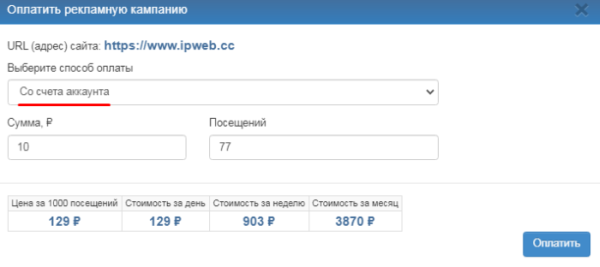
Make sure that you added funds to the campaign account and not to the account account. To transfer funds from your account account to your campaign account, on the "Your Sites" page, click the dollar icon ($) next to the campaign name.

Select from the account balance, change the amount and click the "Pay" button.
You can also add impressions to your advertising campaign account by clicking on the plus icon.
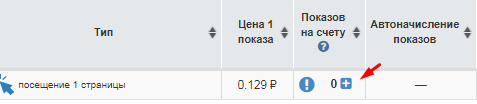
Enter the required number of impressions, based on 1 impression = 1 target action (visit, like, subscribe, etc.). For example, for an advertising campaign visitors from a search engine, in order to get 100 visitors, you need to add 100 impressions to the advertising campaign account.

-
See also:
There is a risk. The initial problem with the ban is the unnaturally high CTR. Such accounts fall into the “risk zone”, then information on them is checked, and if unnatural intersections/repetitions of the audience are found, then mass blocking occurs after a critical mass of statistics has been reached. How to avoid a ban:
- keep CTR at a natural level;
- keep small volumes for each account to avoid collecting large intersection statistics;
- maximize the uniqueness of traffic.
Frequently asked questions about earning money
Below we list various reasons why this may happen.
Multi-account
According to the rules of our service, it is prohibited to have two or more IPweb accounts. If the system detects that you have several accounts, the withdrawal of funds from them is blocked. If you have an additional account, then most likely this is the cause of the withdrawal problems. We strongly recommend that you delete additional accounts and send us confirmation of this action.
Replenishing an account through one payment system and attempting to withdraw funds through another.
The use of IPweb as an exchange office is strictly prohibited. To remove the withdrawal block, you need to fully spend these funds on paying for the services of the service, for example, create an advertising campaign.
Withdrawal of unused balance.
In some cases, it can also cause problems with withdrawal of funds. If you not only create advertising campaigns, but also earn money in our service by completing tasks, please notify us about this. Otherwise, we recommend spending money on the service, then the withdrawal will be automatically unblocked.
-
See also:
Availability of active advertising campaigns.
Unlocking will occur automatically when the reserved funds are debited from the account.
We officially allow the use of VPN for earnings and there will be no problems with withdrawing funds.
However it is important to follow a few simple rules when using a VPN.
1. The first rule: do tasks not only with a VPN.
This way you will physically get more tasks.2. First, we perform tasks without a VPN, and then with it.
First, you will receive tasks only for your region, and then completely new tasks that are available for other regions.3. Don't use free VPNs.
This is how you take away the chance to get a ban on your social network account and other problems.4. Do not switch VPN locations too often.
The frequent change of countries also leads to the risk of being blocked on social media.Learn more Read here! 🔥
The maximum support response time is 1 day, but usually we respond within ~6 hours - it depends on the complexity of the situation and support workload ☺️