Pinterest has long stopped being just a “home inspiration board” and has turned into a powerful visual search engine where people intentionally search for ideas, solutions, and products. For businesses this means three things: you can gain visibility and impressions, drive traffic to your website, support SEO with social signals, and earn through affiliate marketing. In this article we will explore who Pinterest works best for, how to set it up for business, and which strategies actually work.
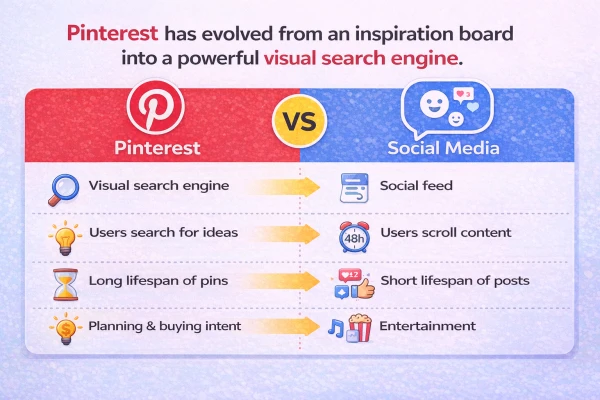
How Pinterest Is Different From Traditional Social Media
Pinterest is not a typical social network. It is a hybrid between a search engine and a visual catalog of ideas. Users don’t come there simply to scroll through a feed they type queries like “bedroom decor ideas,” “keto recipes,” or “home office setup,” and then choose pins that look useful and clickable. A large part of the audience comes with the intention to do something or buy something. Instead of entertainment-based doom-scrolling, Pinterest becomes a search for solutions.
Another advantage for businesses is the lifespan of a pin. A good pin can bring impressions and traffic for months or even years, unlike Instagram posts or stories that usually lose visibility within a day.
Which Businesses Benefit Most From Pinterest
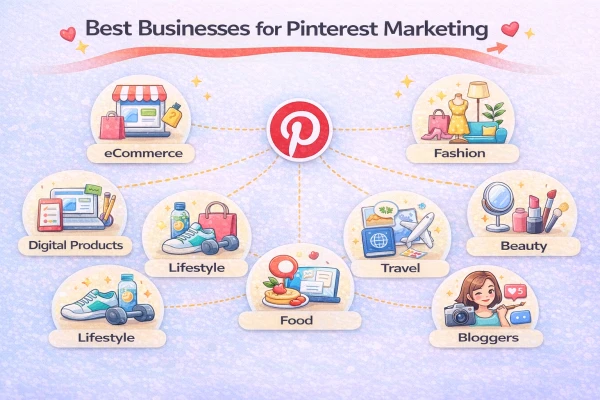
Pinterest works best in niches where the decision is visual and people choose with their eyes.
Suitable types of businesses and creators include:
- Online stores: clothing, accessories, home decor, kids products, kitchen tools, hobby items, cosmetics, stationery and more.
- Brands and experts selling digital products: templates, checklists, guides, courses about design, marketing or self-development.
- Local services with visual results: photographers, decorators, wedding agencies, renovation specialists, beauty salons.
Media websites and bloggers monetizing traffic through ads or affiliate programs.
Businesses can use Pinterest in several ways:
- build brand awareness and impressions
- drive traffic to websites or online stores
- promote affiliate offers
Three Ways to Monetize Pinterest
1. Brand Awareness and Visibility
Pinterest works well as a visual showcase. Your pins constantly appear in recommendation feeds and search results, building visual brand presence. This works especially well in industries where aesthetics matter: fashion, interior design, lifestyle and beauty. You can publish branded pins with your product shown in real contexts, rank for relevant search queries such as “scandinavian living room ideas,” and amplify the reach of successful pins with Pinterest Ads.
2. Driving Traffic to Your Website or Online Store
Every pin includes a clickable link that sends users directly to your website, blog or product page. A person sees an attractive image, reads the title, and clicks to learn more. This provides two main advantages.
First, it can generate sales for e-commerce stores. If your landing page is optimized, Pinterest can bring targeted traffic to product pages, collections or blog articles.
Second, it supports SEO through behavioral signals. Social traffic from Pinterest creates page views and time on site, which can indirectly support organic rankings in search engines.
Because of this, many SEO specialists use Pinterest as a way to support new websites and generate low-cost traffic with decent engagement.
3. Affiliate Marketing Through Pinterest
Pinterest can also work as a storefront for affiliate offers. The platform allows affiliate links as long as you avoid spam and follow the rules.
There are two main scenarios.
- The first is sending traffic to your own blog or review pages where affiliate links are already placed. This is the safest and most flexible approach.
- The second option, in some niches, is linking directly to an affiliate offer if it complies with both Pinterest rules and the affiliate program.
The typical process looks like this:
- Choose a niche such as home decor, fitness products, online courses or software.
- Join affiliate programs such as Amazon Associates, marketplace partner programs, SaaS referral programs or CPA networks.
- Create pins targeting search queries like “best tools for…”, “ideas for…”, or “checklist for…”.
- Optimize titles and descriptions using keywords people actually search for.
- Send traffic to either a blog post or the affiliate offer and track clicks and conversions.
Pinterest Business: How to Set Up an Account for Business
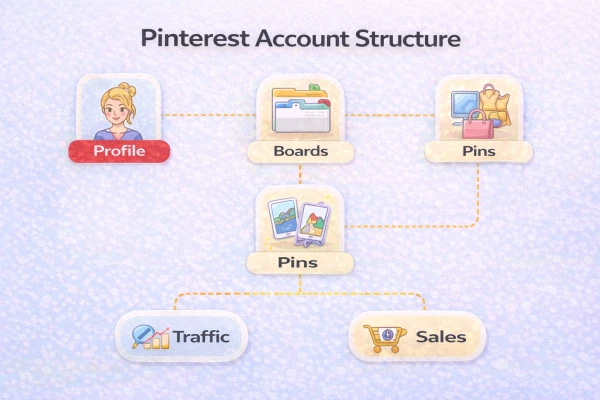
To use Pinterest as a business tool, you should switch from a personal profile to a Pinterest Business account. A business account provides access to analytics, advertising tools, Rich Pins and additional features.
Setup steps include:
- Switch your profile to Pinterest Business.
- Optimize your profile name with keywords. For example, instead of “Anna Studio,” use “Anna Studio | Scandinavian Home Decor”.
- Add a clear profile description explaining who you are, what you offer, and what topics your account covers.
- Create boards based on main product categories or search queries such as “kitchen ideas,” “storage solutions,” or “bedroom decor.”
- Verify your website and enable Rich Pins so that information about articles, products or recipes is automatically pulled from your site’s metadata.
In practice, you are building a visual SEO structure where your profile, boards and pins match the way people search for ideas and products.
Pinterest Ads: How Advertising Works
What Pinterest Ads Can Do for Businesses
Pinterest combines the best of social media and search: content can be discovered via feeds, recommendations and keyword search.
For example, a small online clothing brand can upload outfit ideas, and potential customers will discover these pins while searching for “summer capsule wardrobe” or “office outfits for women”.
Key reasons businesses use Pinterest marketing:
- Stable, long‑term website traffic from pins that keep surfacing in search and recommendations. For instance, a single pin with “10 small kitchen storage ideas” can keep driving clicks to a blog post for months.
- High purchase intent: people come to Pinterest to plan, research and save ideas before buying. Someone searching for “engagement ring ideas” is likely much closer to purchase than a casual social media scroller.
- Strong visual format that highlights products, services and lifestyle scenarios. A home decor store can show before‑and‑after room makeovers instead of just product photos.
Organic growth potential without large ad budgets, especially for niche topics. A handmade soap brand can reach eco‑conscious users by consistently pinning “plastic‑free bathroom” ideas. Pinterest works especially well for ecommerce, lifestyle brands, bloggers and creators whose products and content can be showcased visually (fashion, home decor, beauty, food, travel, digital products, education, etc.).
Pinterest and Affiliate Marketing: A Deeper Look
Pinterest works well for affiliate marketing because it combines search intent with visual discovery. People come to the platform looking for ideas, and you can guide them toward specific products through useful recommendations.
Always check the rules of the affiliate program you join. Some programs require sending traffic to your own website first rather than directly to the affiliate link. Instead of creating just one pin per offer, create multiple variations with different angles: buying guides, mistakes to avoid, top lists or checklists. Idea Pins can also be used as a warm-up format: provide useful mini-guides and place links in your profile or related content.
This creates a simple funnel: interest → useful content → trust → click → purchase.
Practical Tips for Pinterest Promotion
Checklist: How to Promote on Pinterest
1. Research keywords before publishing pins.
- Type a base keyword into Pinterest search and look at the suggested phrases — these are real queries used by your audience.
- Use Pinterest Trends to identify topics that are currently growing in popularity.
- Create a list of 10–30 keywords that will be used in boards and pins.
- Add keywords to the structure of your profile.
2. Give boards names that match search queries, such as “minimalist home office ideas” instead of vague names like “Inspiration.” Include two or three target keywords in board descriptions and briefly explain what users will find there.
3. Add one main keyword and one or two supporting keywords to each pin title and description.
4. Focus your profile on a clear niche instead of mixing unrelated topics. This helps the algorithm understand your audience and recommend your content more accurately.
5. Publish regularly rather than uploading content in large batches. For example, post one to five pins per day or several per week. Consistency is more important than perfection.
6. Design pins that encourage clicks rather than just looking visually appealing. Use vertical images with a 2:3 ratio and clear text overlays such as “10 small kitchen ideas,” “ecommerce launch checklist,” or “5 mistakes when choosing a mattress.”
7. Write descriptions that clearly explain what users will get on the page they click through to, and include a soft call-to-action like “read the guide,” “see all options,” or “download the checklist.”
7. Create clusters of pins around the same topic instead of relying on a single pin. For example, a furniture store might have a board called “Scandinavian Living Room Ideas” with pins about sofas, lighting, coffee tables and storage.
Test pins organically before launching ads. Let them collect impressions and clicks, analyze Pinterest Analytics, and then promote the top-performing pins with Pinterest Ads.
Checklist: How Businesses Should Start on Pinterest
- Define two or three main product categories suitable for Pinterest.
- Switch to a Pinterest Business account and optimize the profile.
- Create three to five boards targeting your main audience queries.
- Prepare 10–20 pins with vertical format, keyword titles, clear visual text and links to relevant pages.
- Track analytics to see which pins generate clicks, saves and traffic.
- After two to four weeks, select the best-performing pins and test small Pinterest Ads campaigns in supported countries.
Pinterest is not just another social media platform. When used correctly, it can generate long-lasting traffic, support SEO through social signals, and drive sales. For e-commerce businesses, digital creators and affiliate marketers, Pinterest is still an underused channel where competition remains lower than on Instagram or TikTok.

Internet Marketer