Steam: Support a Workshop Item
Steam is a global platform for games and user-generated content. With the "Support a Workshop Item" campaign, creators of mods, skins, and other materials can promote their projects by encouraging users to give positive ratings and add items to their favorites, which boosts popularity and helps further content development.
To create an advertising campaign, copy the link to the Steam developer account.
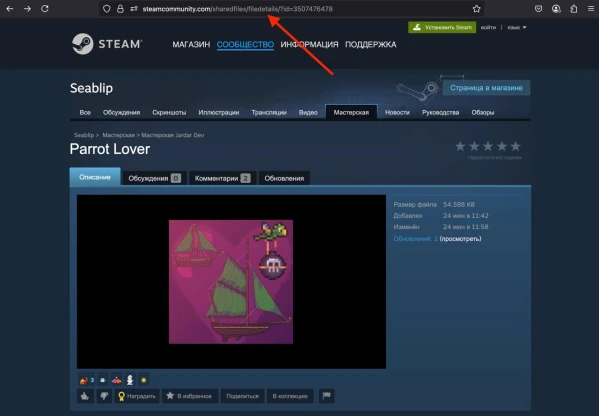
The link might look like this:
https://steamcommunity.com/sharedfiles/filedetails/?id=3507476478
Log into your IPweb account. In the left menu, click "Promotion" — "My Campaigns" — "Add Advertising Campaign" — "Marketplaces" — "Steam" — "Steam: Support a Workshop Item".
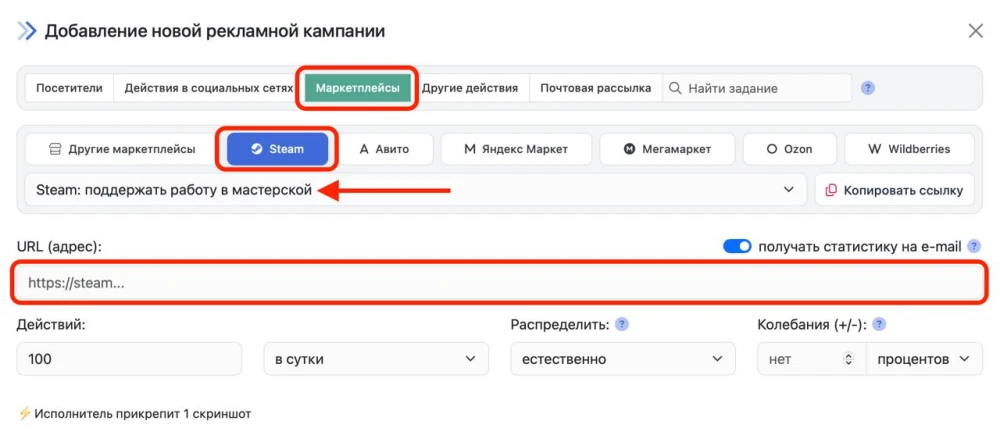
Enter the link, specify the number of actions for your chosen period, and click the "Save" button. You can find more details on setting up other campaign parameters here.
 IPweb
IPweb

Rate the material: