VKontakte: Add as a friend
As part of this advertising campaign, you can purchase friends or followers on VKontakte. This advertising campaign is suitable only for personal profiles.
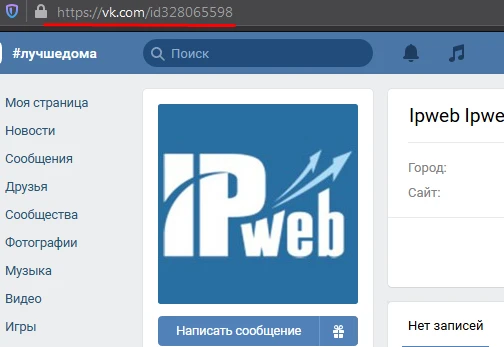
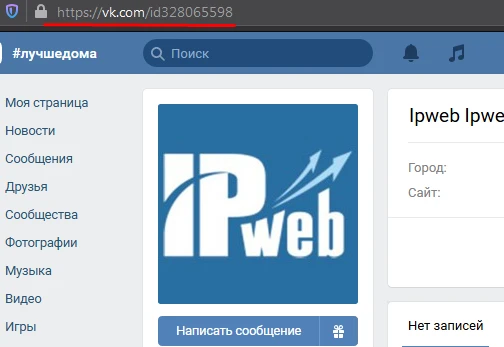
The link will look like this:
To order an advertising campaign, copy the link to your VKontakte page.
Log in to your IPweb account. In the left-hand menu, click “Promotion” — “My Campaigns” — “Add Advertising Campaign” — “Social Media Actions” — «VK» — «VK.com: Add as a friend».
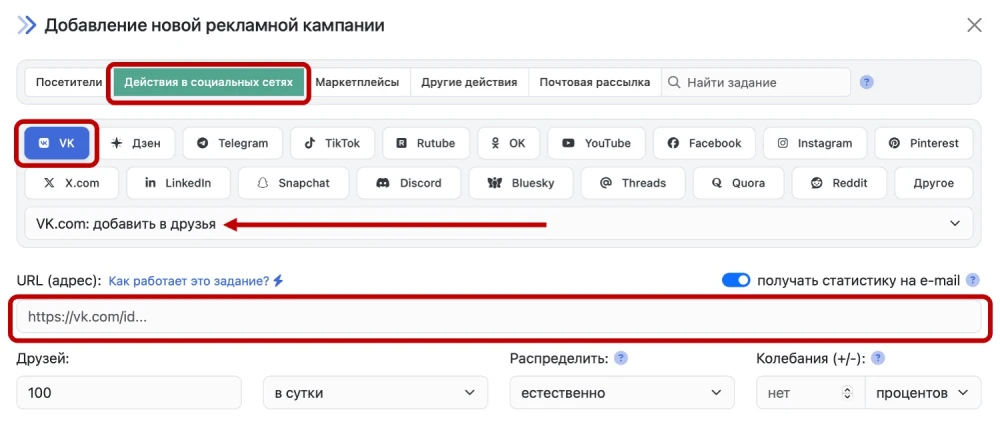
Enter the link to your VKontakte page and the number of friends per day. The difference between friends and followers is that friends are those whose friend requests you have accepted, while followers are those whose requests you did not accept (i.e., you clicked the “Keep as followers” button in response to their request).
The number of followers is displayed below your profile photo. Followers see all your posts and updates just like friends do, but they are not listed in your friends list. In addition, you can set specific privacy settings for them—for example, prevent followers from sending you private messages (in which case only friends will be able to do so), etc. Groups and public pages also have followers. Followers of a public page or group are, in essence, simply members of the community. If you need to increase the number of subscribers to a group, order the advertising campaign “VK.com: Join Group/Subscribe
⚠️ When ordering friend acquisition, use common sense. Do not order more friends per day than you currently have. Estimate what kind of friend influx would look natural and specify that number. If a user who has only 10–15 friends starts adding 200 people as friends per day, this will raise suspicion and may lead to sanctions from the social network’s administration.
 IPweb
IPweb
Rate the material: