VKontakte: Share this link
As part of this advertising campaign, you can order the publication of your link on the VKontakte social network. Users will visit the social network and share your link with their friends on their profiles.
The link will look like this:
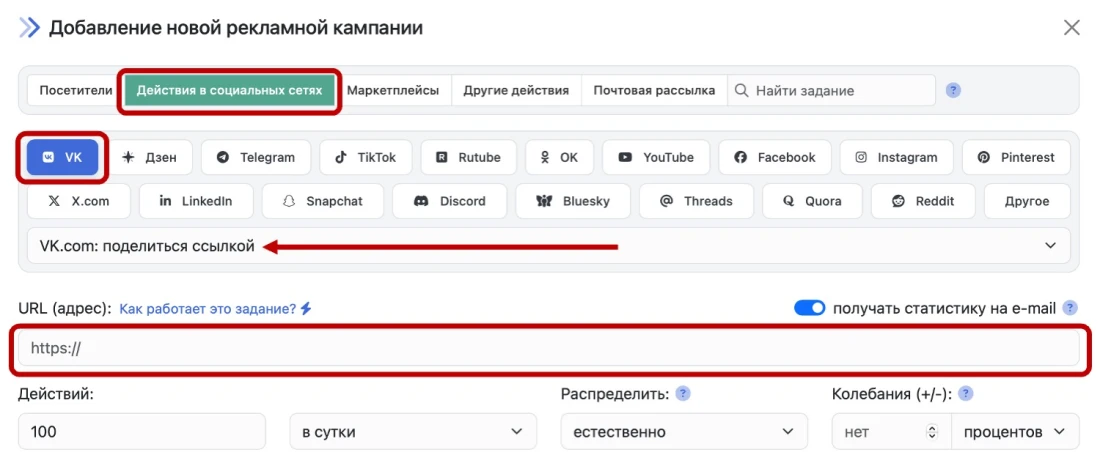
Log in to your IPweb account. In the menu on the left, click “Promotion” – “My Campaigns” – “Add Advertising Campaign” – “Social Media Actions” — «VK» — «VK.com: share link».
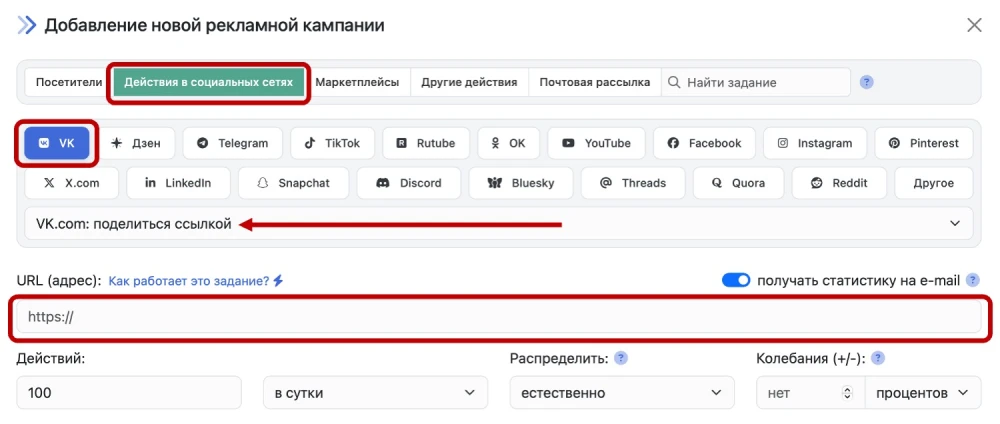
Enter a link to your resource and the number of posts per day.
Promoting a video on YouTube via VKontakte
You can also order this advertising campaign to promote your video on YouTube. Users will share your video from YouTube and post the link on their VKontakte profiles. To do this, select this campaign type and use the link to your video as the URL.
Please note that since VKontakte retrieves information about the published page from your website, it is best to prepare the page for publication in advance. Set specific parameters for the title, description, and images for social media. To do this, you will need to add the following tags to the «head» section of the page code:
⚠️ VKontakte may “freeze” some of your followers if they do not fit the statistical “pattern” or typical user behavior. Followers who show no activity (do not like, repost, or comment) fall into the risk zone. As a result, we recommend that you order and use comprehensive tasks for the most “natural” promotion possible.
 IPweb
IPweb
Rate the material: