Odnoklassniki: Boosting Friends
This advertising campaign is intended only for personal pages (profiles).
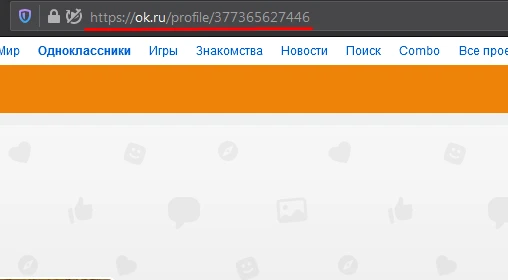
A link to a profile might look like this:
For the advertising campaign to work correctly, you will need to approve all incoming friend requests within 48 hours.
If you want to increase the number of friends on Odnoklassniki, use the advertising campaign «Odnoklassniki: Add as Friend». A link to your page will be shown to the number of users you specify, and each of them will add you as a friend. To create an ad campaign, copy the link to your Odnoklassniki profile from your browser.
Log in to your IPweb account. In the left-hand menu, click “Promotion” — “My Campaigns” — “Add Advertising Campaign” — “Social Media Actions” — «OK» — «Odnoklassniki: Add as Friend».
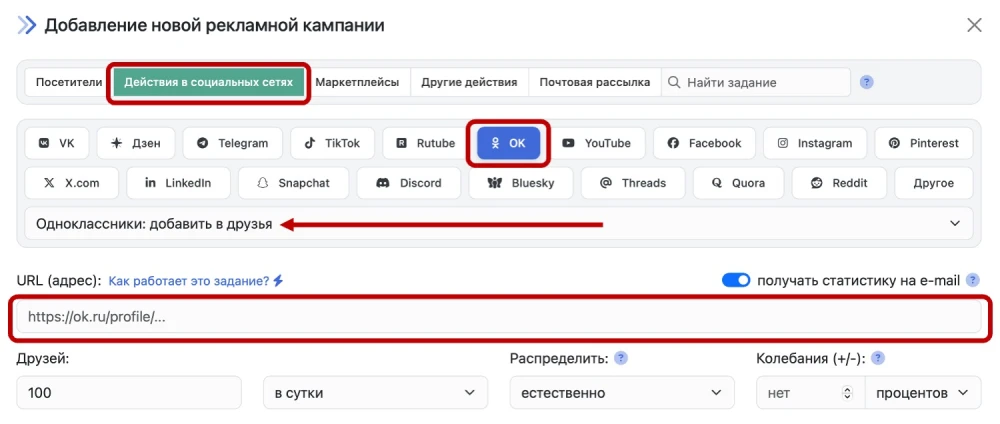
Enter the page URL in the appropriate field. Specify the number of friends you want added per day.
Please note that when ordering friend additions, you should use common sense. Do not order more friends per day than you currently have. Estimate what kind of friend influx would look natural and specify that number. If a profile that has only 10–15 friends starts adding 200 people as friends per day, this will raise suspicion and may lead to sanctions from the social network’s administration.
Launch an advertising campaign Odnoklassniki: add as friends
 IPweb
IPweb
Rate the material: