Facebook: write a comment
This advertising campaign allows you to order comments to Facebook posts. Comments from our users that are at least 10 characters long will be counted. Only experienced users will be able to complete this task. This advertising campaign can be created for a Facebook page or group.
The link to the post on the page looks like this:
https://www.facebook.com/ipweb.ru/posts/2965001906915596
The link to the post in the group looks like this:
https://www.facebook.com/groups/ipweb.ru/permalink/2583298425320528/
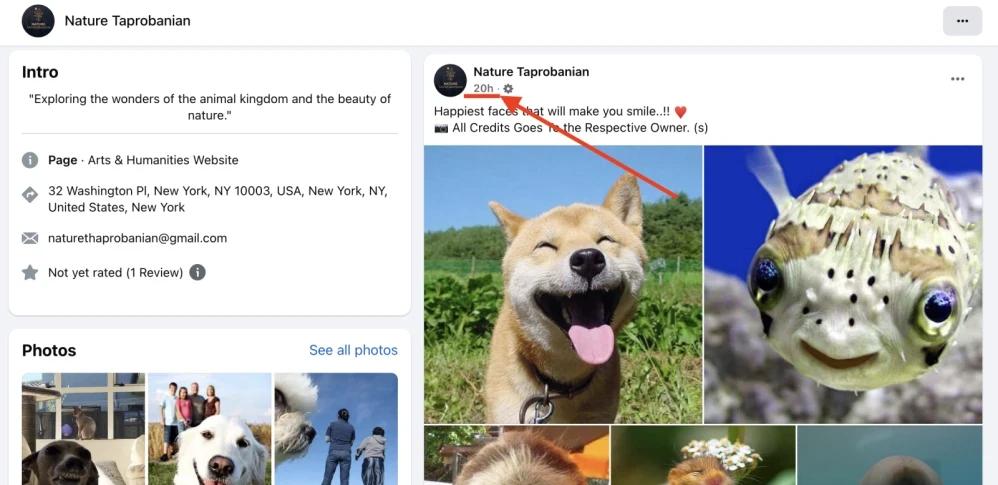
To order comments to a Facebook post, copy the link to the post. To do this, right-click on the date and copy the link.
Log in to your IPweb account. In the menu on the left, click "Promotion" - "My campaigns" - "Add an advertising campaign" - "Actions on social networks" - "Facebook" - "Facebook: write a comment".

Enter the link to the publication on Facebook and the number of comments per day. Select the appropriate instruction and click "Save".
How to set up the geography of the issuance and other parameters of the advertising campaign tell here.
 IPweb
IPweb

Rate the material: