Tracking website promotion statistics
Key statistics (number of visits/actions for the current day and hour) for advertising campaigns are listed in the summary table on the “List of Promoted Campaigns” page.

When you click on the icon with the chart in the row of the selected advertising campaign

a window opens with detailed statistics on the number of visits per hour for the current day and the number of visits over the last 30 days.
. jpg“ style=)
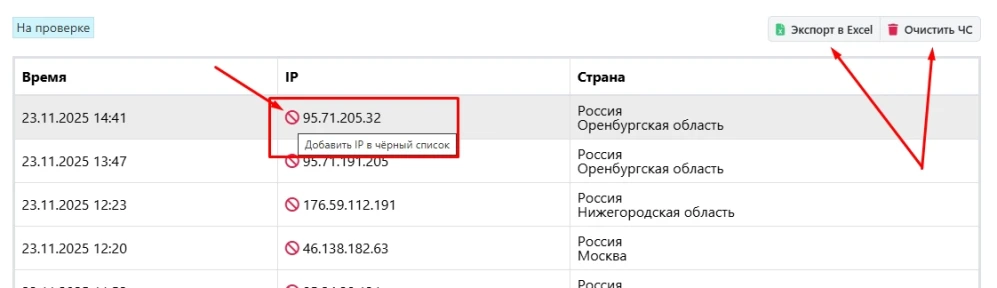
Here, under the ”Statistics by IP Address" button, detailed traffic statistics for the current day are available—including the exact time of the visit, the visitor's location, and their IP address. If necessary, you can verify this information against your web server logs.

In addition, in this window you can add a specific IP address to the blacklist, clear the entire blacklist, and export data to Excel.
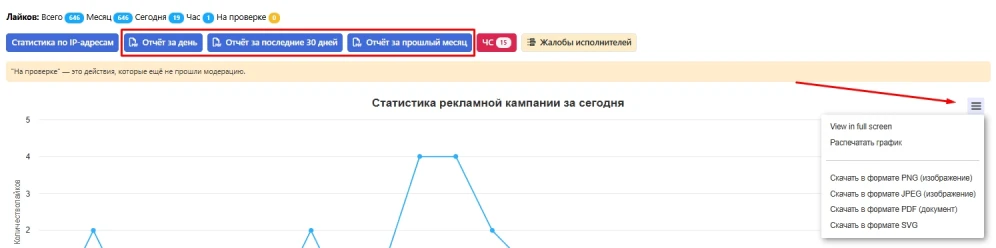
In the main statistics window, you can export data for the current day, the last 30 days, or the past month in PDF format. You can also download the statistics graph as an image and print the graph on a printer.
A separate button displays complaints from contractors and statistics on their missed tasks and task blocks. Please note that all complaints are processed by moderators, and campaign settings may be changed based on the contractors' feedback.

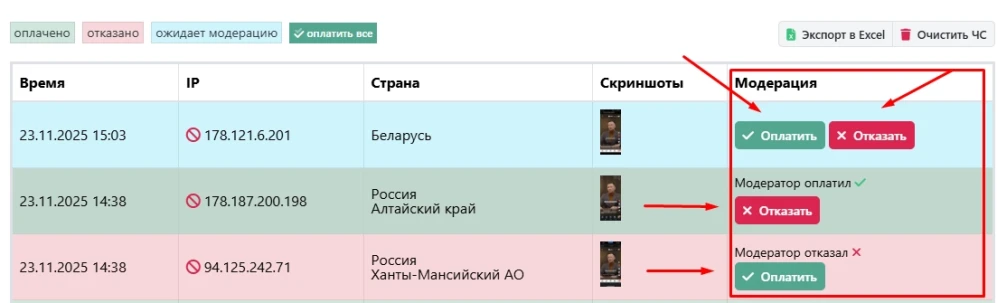
For tasks verified by screenshots, under the “Screenshots and IP Addresses” button, you can also view all performers' submissions—those under review, paid, and rejected. Here, you can also independently review the submissions and appeal a moderator’s decision if you disagree with it. If a submission is rejected based on a screenshot, it will be sent for additional review by moderation. If you have any questions regarding the final decision, contact support.
 IPweb
IPweb

Rate the material: