Amazon: Share this product on social media
If you want to increase the flow of new customers on Amazon, this campaign is for you. Our team will share your product on various social media platforms, so more people outside the marketplace will see it.
To create an ad campaign, copy the link to your product from the browser’s address bar or by clicking the ⍐ (“Share”) button → “Copy Link.” We recommend removing UTM parameters when adding links to Amazon. This will make the links shorter. Additionally, it’s difficult to predict how the presence of UTM parameters will affect the service’s statistical algorithms.
A product link might look like this:
https://a.co/d/fXpP4w7
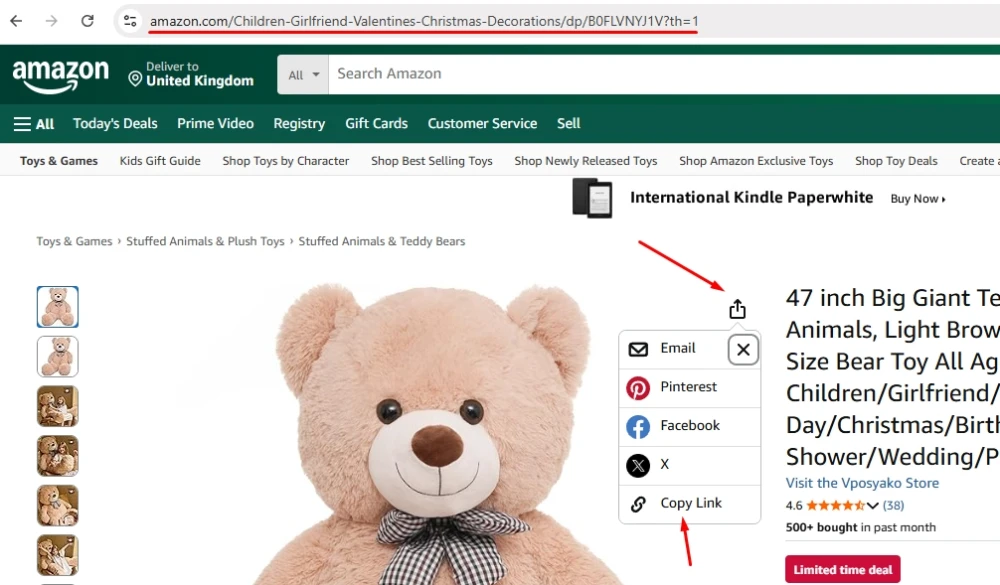
Once you have the link, log in to your IPweb account. In the left-hand menu, click “Promotion” → “My Campaigns” → “Add Advertising Campaign” → “Marketplaces” → “Amazon” → “Amazon: Share Product on Social Media.”

Enter the link to the product page, the number of actions for the desired period, and click the “Save” button. The campaign will immediately be sent for moderation and will launch after it passes review.
We explain how to configure other ad campaign settings here.
Launch an Amazon ad campaign: Share a product on social media
 IPweb
IPweb

Rate the material: