eBay: Add to Cart
eBay is the world’s largest international online platform for buying and selling, combining the features of an online store and an online auction. We offer to create an advertising campaign that will help increase buyer engagement with product listings on eBay. Our team members will add a specific item or any item from your store’s showcase to their carts. eBay’s algorithms will recognize your product selection as appealing to shoppers and will feature it more frequently.
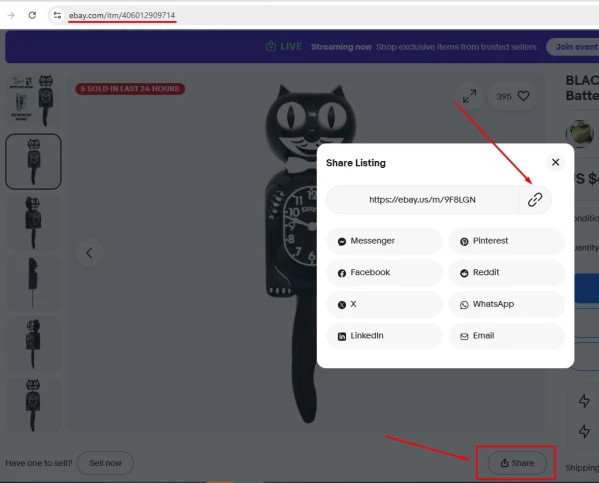
To create an advertising campaign, copy the link to your product or store from the browser’s address bar or by clicking the “Share” button → 🔗 (“Link”). We recommend removing UTM parameters when adding a link to eBay. This will make the links shorter. Additionally, it’s difficult to predict how the presence of UTM parameters will affect the service’s statistical algorithms.
A product link might look like this:
https://ebay.us/m/9F8LGN
A link to the store might look like this:
Once you have the link, log in to your IPweb account. In the left-hand menu, click “Promotion” → “My Campaigns” → “Add Advertising Campaign” → “Marketplaces” → “eBay” → “eBay: Add to Cart.”

Enter the link to the product or store page, the number of actions for the desired period, select the appropriate instruction from the drop-down list, and click the “Save” button. The campaign will immediately be sent for moderation and will launch after it passes review.
We explain how to configure other advertising campaign settings here.
 IPweb
IPweb

Rate the material: