Bluesky: buy reposts
If you want to increase the rating of your post on the Bluesky platform, the campaign type "Bluesky: repost" will suit you. Our performers will go to your account and share its publications. You can order a repost for a single post or for any post in your account.
To create advertising campaign "Bluesky: repost", you need a link to a specific post or to a Bluesky account, if you need to repost any post.
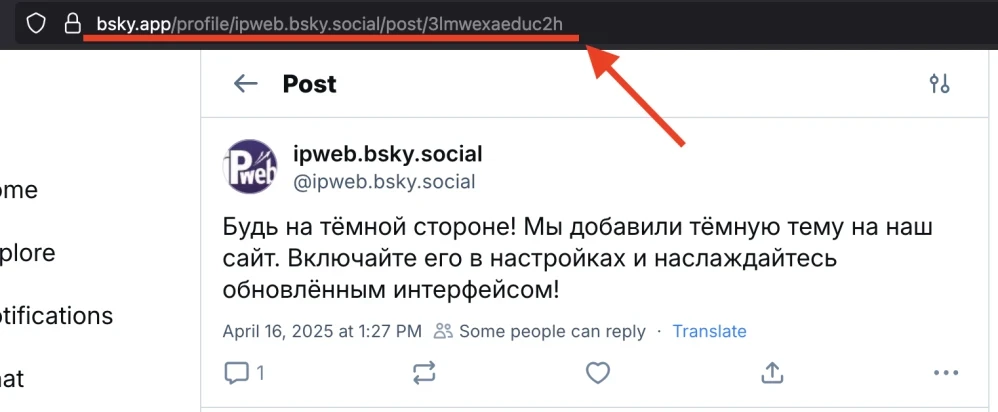
A link to a post can look like this:
https://bsky.app/profile/ipweb.bsky.social/post/3lmwexaeduc2h
to an account like this:
https://bsky.app/profile/ipweb.bsky.social
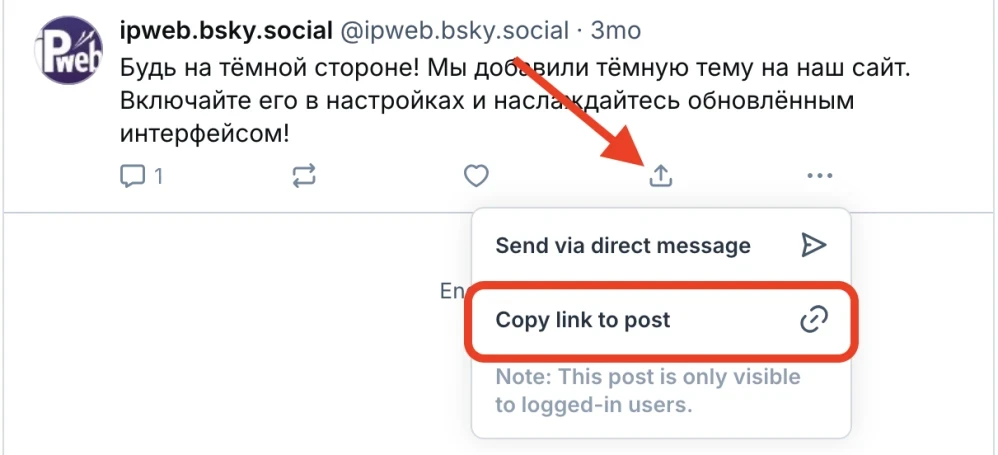
To get a link to a post, on the post page, click on the three dots at the bottom of the publication and click on "Copy link to post" in the drop-down menu.
Or open the post/account and copy the link from the browser address bar.
Log in to your IPweb account. In the menu on the left, click "Promotion" - "My campaigns" - "Add an advertising campaign" - "Actions on social networks" - "Bluesky" - "Bluesky: repost".
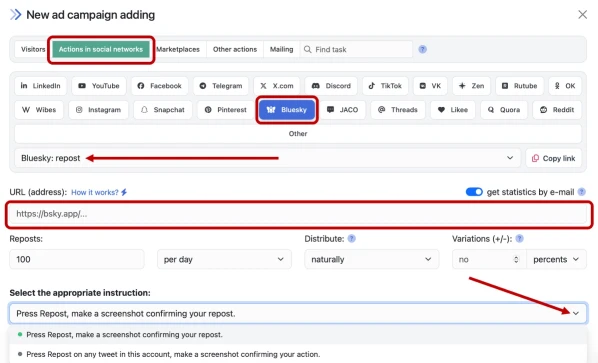
Enter the link to the account/post page, the number of reposts in the desired period, select the appropriate instruction from the drop-down list and click the "Save" button. The campaign will immediately be sent for moderation and will be launched after passing the check.
How to set up the geography of the issuance and other parameters of the advertising campaign tell here.
 IPweb
IPweb

Rate the material: