JACO: Share
JACO is a social video streaming platform that brings people together in one place to share their moments and engage with a wide variety of content—from entertainment and gaming to sports, music, business, and education.
If you want your JACO videos to be shared more often, the “JACO: Share” campaign is for you.
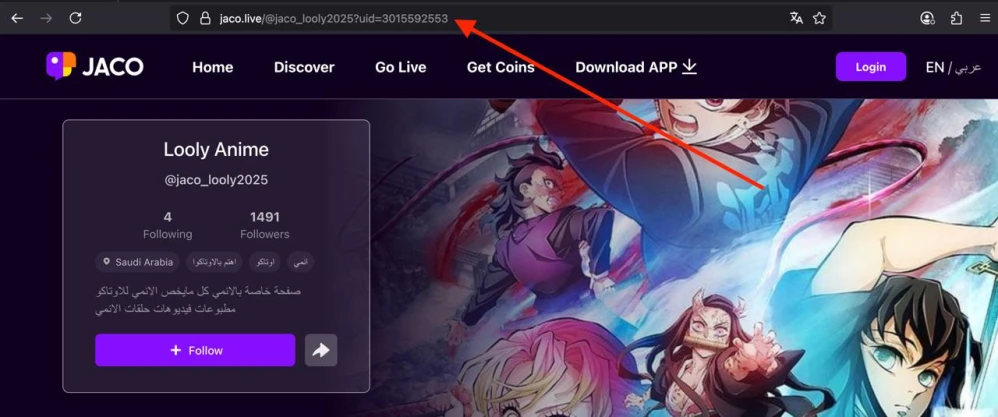
To create an ad campaign, copy the link to your JACO profile or to a specific video. We explain the benefits of promoting your profile here.
A link to your account might look like this:
https://jaco.live/@jaco_looly2025?uid=3015592553
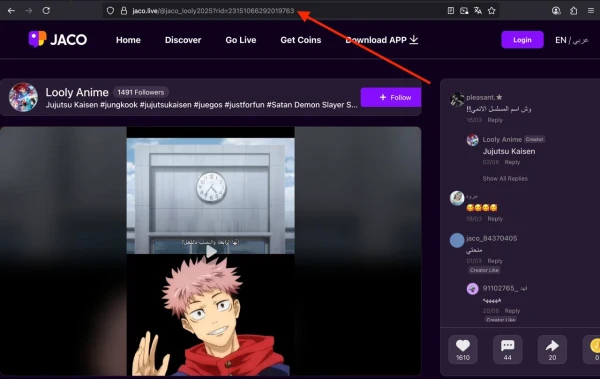
A link to a video might look like this:
https://jaco.live/@jaco_looly2025?rid=23151066292019763
Log in to your IPweb account. In the left-hand menu, click “Promotion” — “My Campaigns” — “Add an Advertising Campaign” — “Social Media Actions” — “JACO” — “JACO: Share.”

Enter the link and the number of followers for the desired period. Select the appropriate instruction from the drop-down list: if you’ve pasted a link to a video, choose “Click the arrow and share the video…”; if you’ve pasted a link to a profile, the instruction “Click the arrow and share any video from the account...” will work. Then click the “Save” button.

We explain how to configure other advertising campaign settings here.
When ordering the service, estimate what kind of user growth would look natural. Don’t order more followers per day than the account currently has. If a page with 10–15 followers starts gaining 200 people a day, this will raise suspicion and may result in penalties from the JACO platform administration.
 IPweb
IPweb

Rate the material: