Complex tasks on Likee
In order to significantly improve the performance of your Likee account and its content, we suggest using complex tasks. They include the performer performing several actions in a row: for example, first he watches a video, then likes it, and then subscribes to the channel. This looks as natural as possible: first the user watched the video, liked it, responded, and then decided to subscribe so as not to miss the latest from your account.
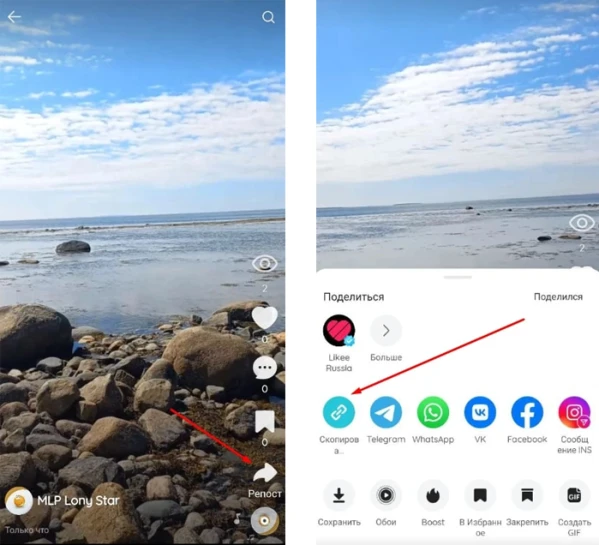
In order to create a campaign, you need to get a link to the video. To do this, click the "Repost" button on the video or in the profile, then "Copy link".
The link to the video may look like this:
https://l.likee.video/v/4JHroW
Log in to your IPweb account. In the menu on the left, click "Promotion" - "My campaigns" - "Add an advertising campaign" - "Actions on social networks" - "Likee" - "Likee: view + like + subscribe".
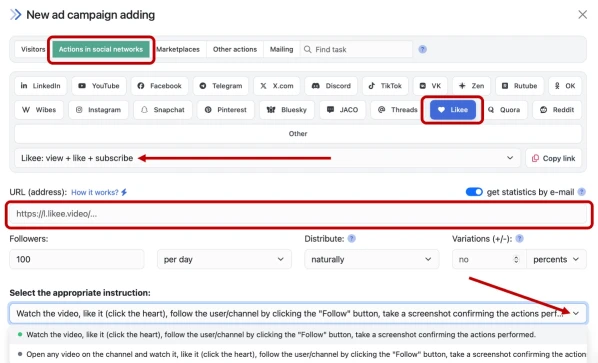
Enter the link to the video, the number of actions in the desired period, and click the “Save” button. The campaign will immediately be sent for moderation and will be launched after passing the check.
How to set up the geography of the issuance and other parameters of the advertising campaign tell here.
 IPweb
IPweb

Rate the material: