Likee: subscribe
Likee is a platform where users can create and distribute short music videos with the ability to add special effects and augmented reality.
If you want to increase the number of subscribers to your Likee account, the “Likee: subscribe” campaign is right for you.
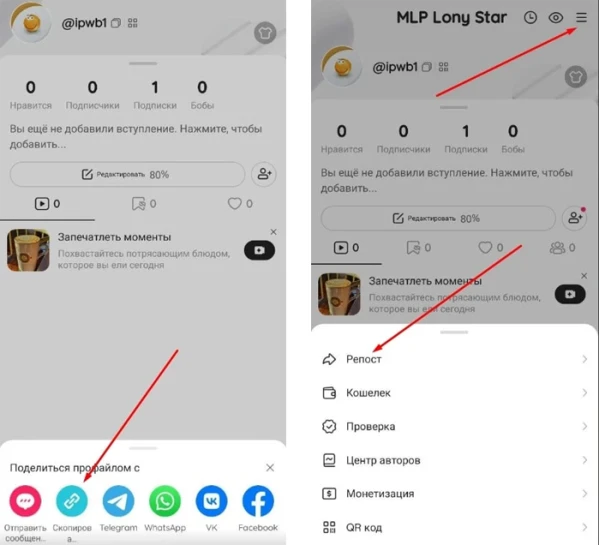
To create an advertising campaign, copy the link to your Likee profile in the application via the “Repost” button.
The profile link may look like this:
Log in to your IPweb account. In the menu on the left, click "Promotion" - "My campaigns" - "Add an advertising campaign" - "Actions on social networks" - "Likee" - "Likee: subscribe".
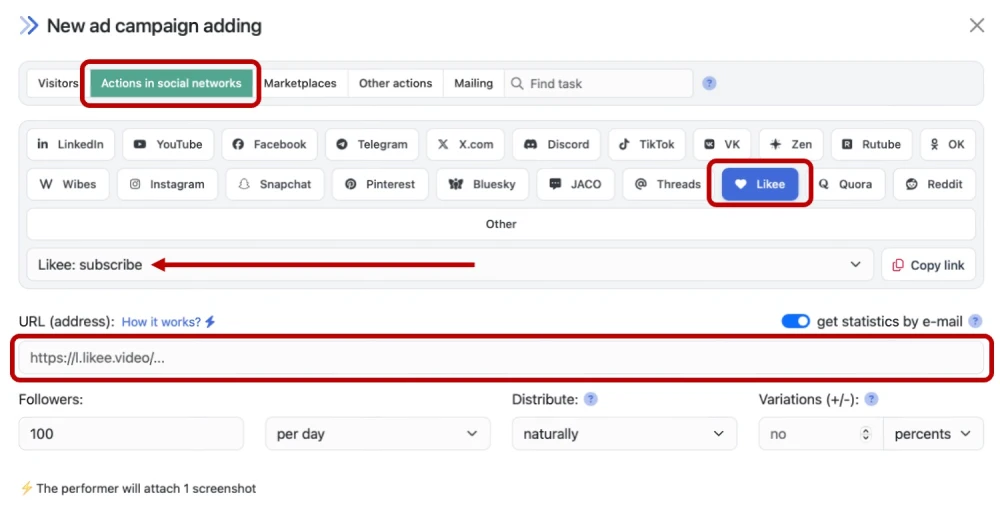
Enter the link to the Likee profile, the number of subscribers in the desired period and click the “Save” button. How to set up the geography of the issuance and other parameters of the advertising campaign tell here.
When ordering the service, estimate what kind of user influx will look natural. Do not order more subscribers per day than the account currently has. If 200 people per day start adding to a page with 10-15 followers, this will raise suspicions and may lead to sanctions from the Likee platform administration.
 IPweb
IPweb

Rate the material: