Complex Tasks in MAX
As part of this advertising campaign, you can significantly improve the performance of your channel or chat on MAX. It involves the user performing several actions in succession: for example, first they view a post and react to it, and then they subscribe to the channel. This looks as natural as possible: the user saw the post, liked it, reacted to it, and then decided to subscribe to the channel as well to follow its content.
The “MAX: React to a Post + Join a Chat/Subscribe to a Channel” action scenario is now available. You can modify the instructions and specify a link to a channel or chat if you want users to react to any post within it.
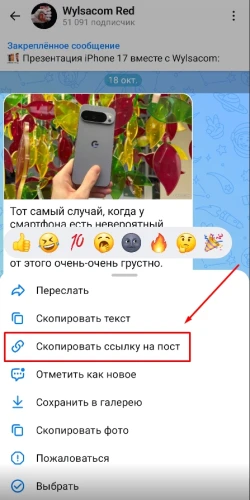
To create a comprehensive advertising campaign, tap a post in the MAX app and copy the link using the “Copy Post Link” button. If you want reactions for any post, tap “⋮” → “Share Channel” → "Copy" or "Share Link" for channels, and "Invite via Link" → "Share Link" → "Copy" for chats.
A post link might look like this:
https://max.ru/WylsacomRed/AZn2asJ1Oik
and a channel link might look like this:
https://max.ru/WylsacomRed
to a chat:
https://max.ru/join/ZEDC7FnaRkge1nRiJFRHcoHmQN9mWrQfcw1aYQVC1h4
Log in to your IPweb account. In the menu on the left, click “Promotion” → “My Campaigns” → “Add an Advertising Campaign” → "Social Media Actions" → "MAX" → "MAX: React to a Post + Join a Chat/Subscribe to a Channel."

Enter the link to the post/chat/channel, the number of actions for the desired period, add instructions if necessary, and click the “Save” button. The campaign will immediately be sent for moderation and will launch after it passes review.
We explain how to configure other advertising campaign settings here.
Launch a MAX ad campaign: react to a post + join a chat/subscribe to a channel
 IPweb
IPweb

Rate the material: