MAX: Boosting Reposts on Posts
This campaign helps increase the popularity of posts on a MAX channel or chat through user reposts. You can request a repost of either a specific post or any post on the channel or in the chat.
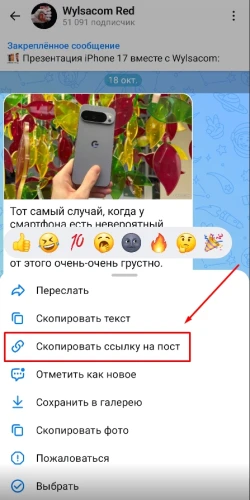
To create an ad campaign for reposts of a specific post, tap the post in the MAX app and copy the link using the “Copy Post Link” button. If you want to share any post, tap “⋮” → “Share Channel” → “Copy” or “Share Link” for channels, and “Invite via Link” → “Share Link” → “Copy” for chats.
A post link might look like this:
https://max.ru/WylsacomRed/AZn2asJ1Oik
and a channel link like this:
https://max.ru/WylsacomRed
to a chat:
https://max.ru/join/ZEDC7FnaRkge1nRiJFRHcoHmQN9mWrQfcw1aYQVC1h4
Log in to your IPweb account. In the left-hand menu, click “Promotion” → “My Campaigns” → “Add an Advertising Campaign” → “Social Media Actions” → “MAX” → “MAX: Share (Repost).”

Enter the link to the post/channel/chat, the number of reposts for the desired period, select the appropriate instructions from the drop-down list, and click the “Save” button. The campaign will immediately be sent for moderation and will launch after it passes review.
We explain how to configure other advertising campaign settings here.
 IPweb
IPweb

Rate the material: