MAX: Inflating the number of reactions on posts
As part of this advertising campaign, you can increase the number of reactions to posts in a MAX channel or chat. You can order reactions for either a specific post or any post in the channel or chat.
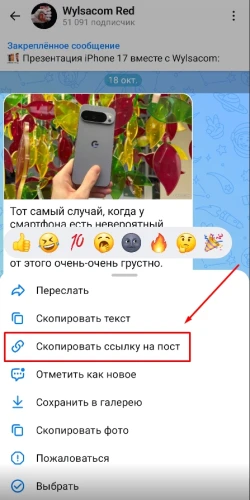
To create an ad campaign for reactions to a specific post, tap the post in the MAX app and copy the link using the “Copy Post Link” button. If you want reactions for any post, tap “⋮” → "Share Channel" → "Copy" or "Share Link" for channels, and "Invite via Link" → "Share Link" → "Copy" for chats.
A post link might look like this:
https://max.ru/WylsacomRed/AZn2asJ1Oik
and a channel link like this:
https://max.ru/WylsacomRed
to a chat:
https://max.ru/join/ZEDC7FnaRkge1nRiJFRHcoHmQN9mWrQfcw1aYQVC1h4
Log in to your IPweb account. In the left-hand menu, click “Promotion” → “My Campaigns” → “Add Advertising Campaign” → “Social Media Actions” → “MAX” → “MAX: Reactions to a Post.”

Enter the link to the post/channel/chat, the number of reactions for the desired time period, and click the “Save” button.
We explain how to configure other ad campaign settings here.
 IPweb
IPweb

Rate the material: