Soundcloud: boosting likes
As part of this advertising campaign, you can order likes for a track, album, and playlist on the popular music platform Soundcloud. Each performance has its own instruction, which you need to select depending on the necessary actions.
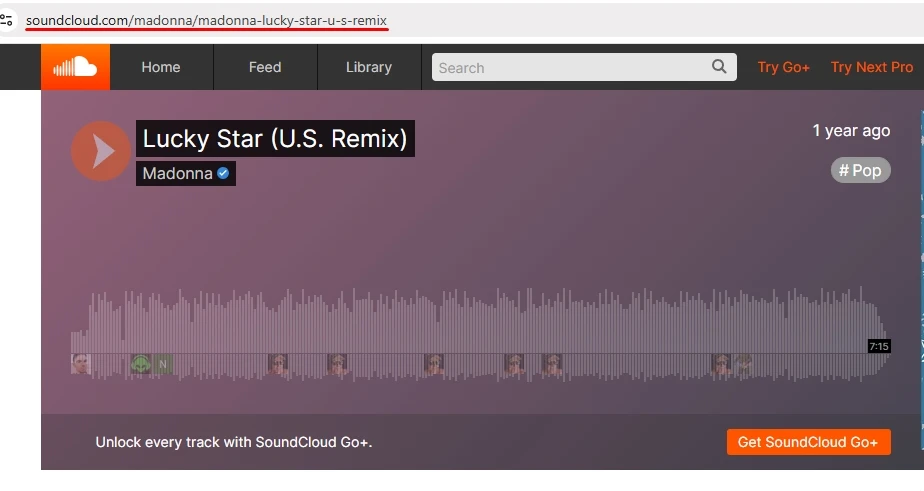
To create an advertising campaign, copy the link in the Soundcloud card.
The link to the track may look like this:
https://soundcloud.com/madonna/madonna-lucky-star-u-s-remix
https://soundcloud.com/madonna/madonna-lucky-star-u-s-remix?si=167a942b5fa84dca8c2662db032c60bc&utm_source=clipboard&utm_medium=text&utm_campaign=social_sharing
to the album:
https://soundcloud.com/madonna/sets/deadpool-wolverine-madonnas
https://soundcloud.com/madonna/sets/deadpool-wolverine-madonnas?si=8e6347fcad5d41ba9ef69967f35aa4d0&utm_source=clipboard&utm_medium=text&utm_campaign=social_sharing
to the playlist:
https://soundcloud.com/jfkmusic/sets/pri-madonna-playlist
https://soundcloud.com/jfkmusic/sets/pri-madonna-playlist?si=132c27e1ead948daa041b8fda1a74955&utm_source=clipboard&utm_medium=text&utm_campaign=social_sharing
Log in to your IPweb account. In the menu on the left, click "Promotion" - "My campaigns" - "Add an advertising campaign" - "Actions on social networks" - "Soundcloud" - "Soundcloud: like".
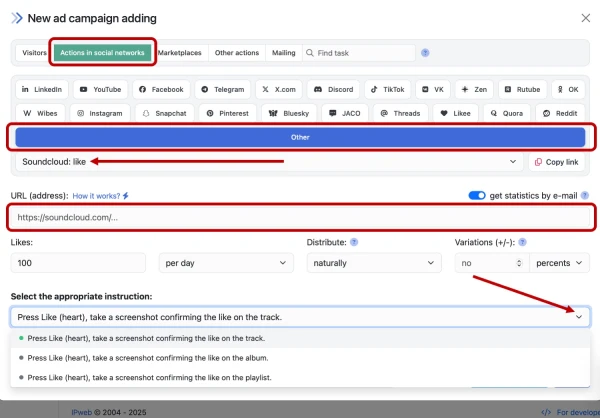
Enter the link to the track/album/playlist, the number of likes in the desired time period, select the appropriate instruction from the drop-down list and click the "Save" button. The campaign will immediately be sent for moderation and will be launched after passing the verification.
How to set up the geography of the issuance and other parameters of the advertising campaign tell here.
 IPweb
IPweb
Rate the material: