Boosting subscribing
If you want to increase the number of subscribers in a social network or other Internet resource, but this social network or Internet resource is not included in the list of social networks that are presented in the "Social Network Actions" tab, use the "Subscribe (to the channel, user, etc.)" advertising campaign.
Our performers will follow the link that you specify when creating an advertising campaign, perform the action that you specify in the instructions (subscribe to a channel or user) and confirm their execution with a screenshot.
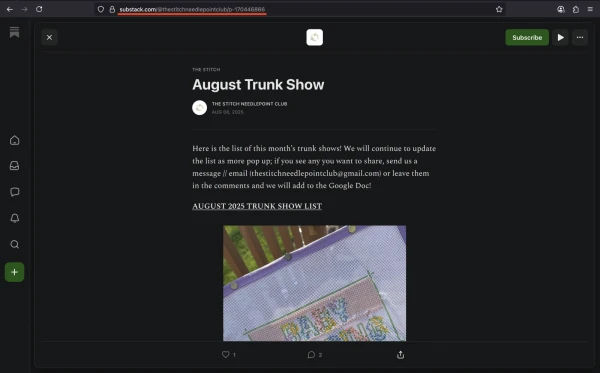
The link to the channel or user may look like this:
https://substack.com/@thestitchneedlepointclub/p-170446866
To add an advertising campaign, copy the link from the browser address bar.
Log in to your IPweb account. In the menu on the left, click "Promotion" - "My campaigns" - "Add an advertising campaign" - "Actions on social networks" - "Other" - "Subscribe (to the channel, user, etc.)".
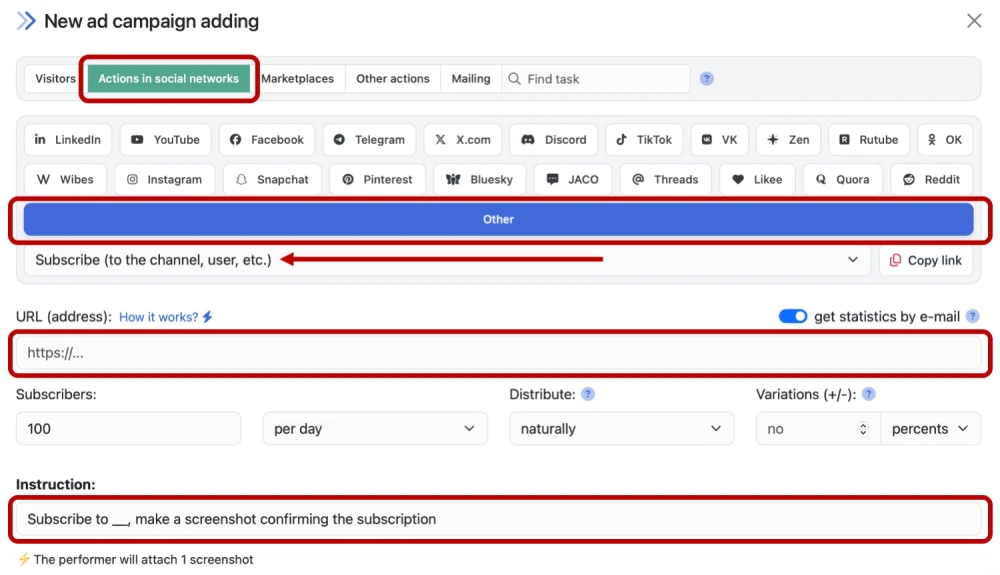
Insert a link to your resource, specify the number of executions and change the instructions so that performers can complete the task and confirm the completion.
How to set up the geography of the issuance and other parameters of the advertising campaign tell here.
 IPweb
IPweb

Rate the material: