Threads: Comment on a Post
If you want your Threads account posts to gain more popularity, a comment-boosting campaign is the right choice for you. You can order comments for specific posts or for any posts on your Threads account. Comments from our contributors that are at least 10 characters long will be counted. Only experienced users will carry out this task.
To create an advertising campaign, copy the link to your Threads post in the app using the “Share (airplane)” button below the post itself, or copy the link to your Threads profile in the app using the “Share Profile” button.
The link to the post might look like this:
and a link to your profile might look like this:
https://www.threads.net/@viknilus
Log in to your IPweb account. In the menu on the left, click “Promotion” → “My Campaigns” → “Add an Advertising Campaign” → “Social Media Actions” → “Threads” → “Threads: Comment on a Post.”

Enter the link to the Threads post or account and the number of comments for the desired time period.
You can specify the text of the comment that the user will post. To do this, enter the comment text and click the “Add” button. You can also select the commenter’s gender.
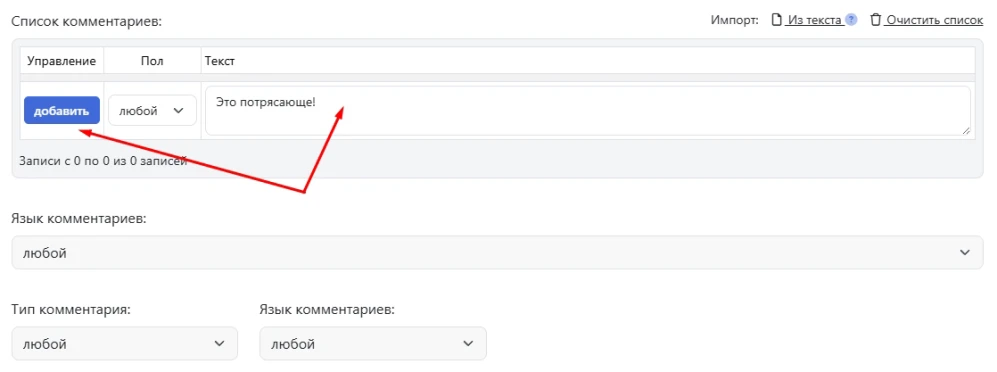
Here, you can also specify the comment type (positive or negative) and select a language from the four system languages (Russian, English, Spanish, Portuguese). If these settings remain at their defaults, the contractor can comment in any language and with any emotion.
Please note that the choice of comment language is not geo-dependent. The task can be assigned to a performer from any region. If you require the task to be localized, these conditions must be specified in the ad campaign settings on the Geographic Targeting tab.
Select the appropriate instruction from the drop-down list and click the “Save” button.

We explain how to configure other ad campaign settings here.
 IPweb
IPweb

Rate the material: