Twitch: boosting subscribers
Twitch is a video streaming service specializing in computer games, including gameplay broadcasts and eSports tournaments. If you want to make your Twitch channel more popular, you will need a subscriber acquisition service.
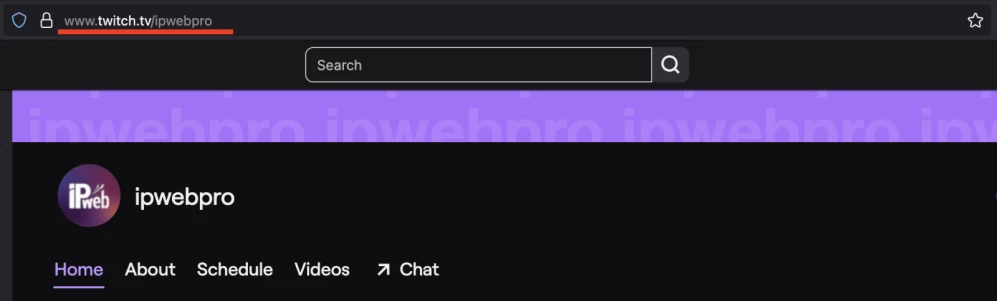
To create an advertising campaign, copy the link to your Twitch channel in the browser address bar.
The link to the page may look like this:
https://www.twitch.tv/ipwebpro
Log in to your IPweb account. In the menu on the left, click "Promotion" - "My campaigns" - "Add an advertising campaign" - "Actions on social networks" - "Other" - "Twitch: follow channel".
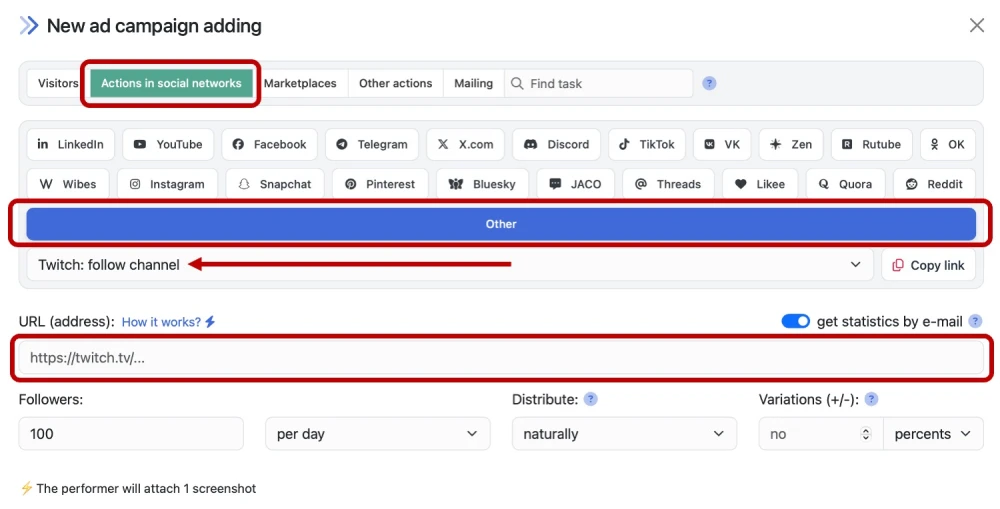
Enter the link to the channel page, the number of subscribers in the desired period and click the "Save" button. How to set up the geography of the issuance and other parameters of the advertising campaign tell here.
When ordering subscribers, evaluate what kind of user influx will look natural. Do not order more subscribers per day than the channel currently has. If a page with 10-15 subscribers starts adding 200 followers per day, this will raise suspicions and may lead to sanctions from the platform administration.
 IPweb
IPweb

Rate the material: