Wibes: Like
If you want to boost the popularity of your Wibes (videos) on the Wibes platform, this campaign is for you. Our service providers will like a specific video or any video on your Wibes account.
To create a campaign, you’ll need a link to the vibe (video) or to your account if you want likes on any video. To do this, open the Wibes video and click the repost button (arrow) → “Link,” or in your account, click the “Share” button → “Link.”
A Wibes link might look like this:
https://wibes.ru/author/1383920/clips/sila-lesa-3470183
and a link to an account might look like this:
https://wibes.ru/author/1383920
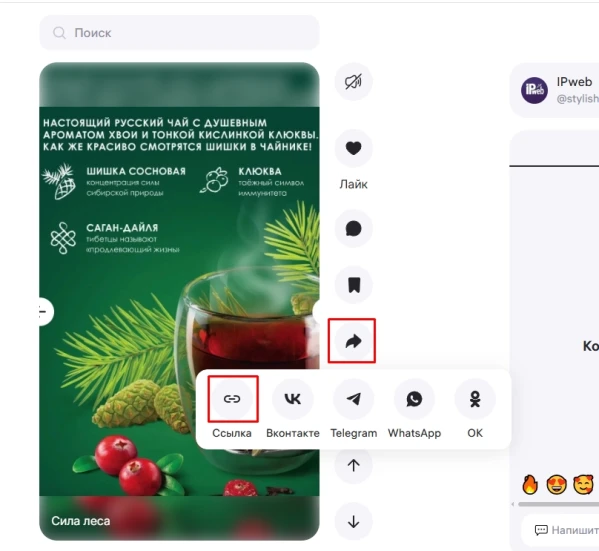
Log in to your IPweb account. In the left-hand menu, click “Promotion” → “My Campaigns” → “Add an Advertising Campaign” → “Social Media Actions” → “Wibes” → “Wibes: Likes.”

Enter the link to the Wibes video or account, the number of actions for the desired period, select the appropriate instructions from the drop-down list, and click the “Save” button. The campaign will immediately be sent for moderation and will launch once it passes review.
We explain how to set up targeting by location and other advertising campaign parameters here.
 IPweb
IPweb

Rate the material: