Complex tasks on YouTube
With this advertising campaign, you can significantly improve the performance of your channel or individual videos on YouTube. It involves the user performing several actions in a row: for example, first they watch a video, then they like it, and then they subscribe to the channel. This looks extremely natural: first the user watched the video, liked it, they liked it, and then they decided to subscribe to the channel. There are six types of this advertising campaign. They differ in the scenario of actions:
- YouTube: watch video, like it
- YouTube: watch video, dislike it
- YouTube: watch video, like, subscribe to the channel
- YouTube: watch video, like, subscribe, comment
- YouTube: watch video, like, share
- YouTube: watch video, like, subscribe, share
Using these types of advertising campaigns, you can add links to a video or a channel (in this case, users will complete the task on any video from the channel).
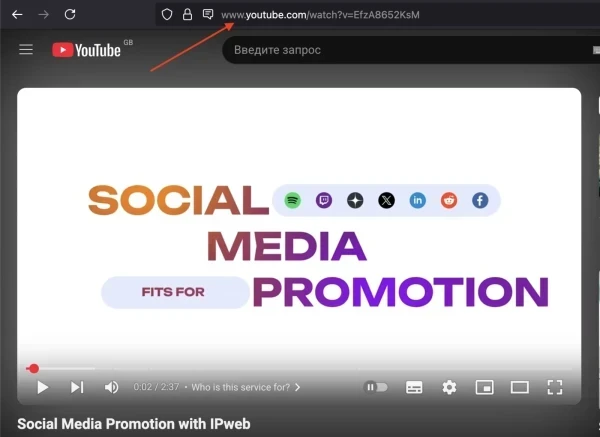
A link to a YouTube video might look like this:
https://www.youtube.com/watch?v=jk6EvuEYZZ4
To add such an advertising campaign, copy the link to your video, as shown in the screenshot.
Log in to your IPweb account. In the menu on the left, click "Promotion" - "My campaigns" - "Add an advertising campaign" - "Actions on social networks" - "YouTube" - "YouTube: watch video, like, subscribe to the channel".
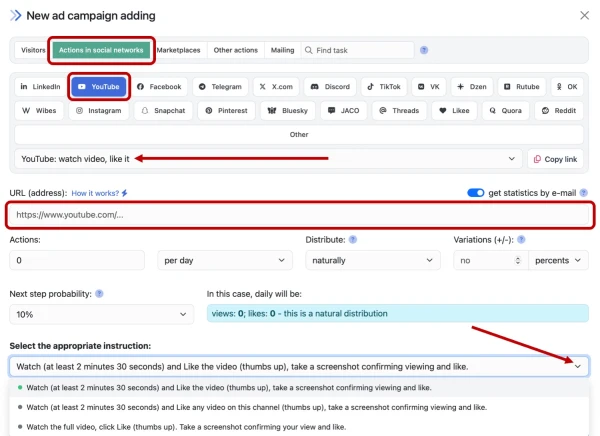
Enter the link to the YouTube video and the number of executions per day. If necessary, select the appropriate instruction.
How to set up the geography of the issuance and other parameters of the advertising campaign tell here.
 IPweb
IPweb

Rate the material: