YouTube: buy likes for comments
As part of the advertising campaign "YouTube: like comment" you can order likes for the desired comments under the video on YouTube.
The link may look like this:
https://www.youtube.com/watch?v=SSyPTnEtqBQ&lc=UgyYP56u37HEdBEQYil4AaABSs
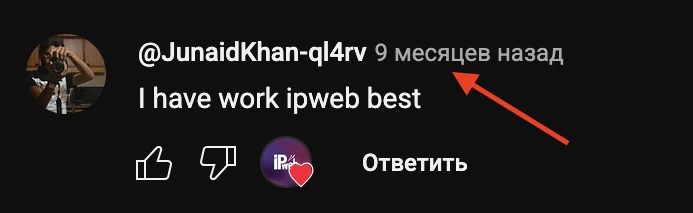
To order an advertising campaign, copy the link to the comment. To do this, right-click on the date and copy the link.
Log in to your IPweb account. In the menu on the left, click "Promotion" - "My campaigns" - "Add an advertising campaign" - "Actions on social networks" - "YouTube" - "YouTube: like comment".
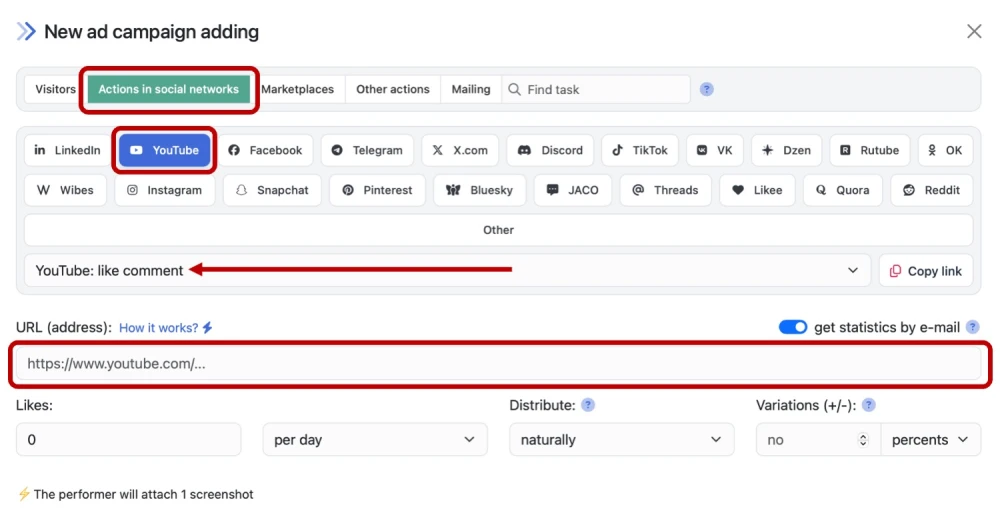
Enter the link to your comment under the video on YouTube and the number of likes per day.
How to set up the geography of the issuance and other parameters of the advertising campaign tell here.
 IPweb
IPweb

Rate the material: